A 3D configurator shows your product exactly as the customer is putting it together: colour, material, size and options, visible immediately and from every side. Modelwright builds 3D product configurators for manufacturers, retailers and brands. Each one is built for your product and your rules, and runs as a standalone page or embedded in your website or shop. It works in the browser on desktop, tablet and phone, with no app and no plugin.
What we build
We don't sell a template that your product has to fit into. Every configurator is made for a specific product or system. These are the usual building blocks, and you can try all of them in our examples:
- Options and sizes: colours, materials and trims, plus stepless dimensions such as width and depth on the glass room, or room and door sizes on the modular sofa.
- Rules that only allow valid variants: in the automation cell the robot is only available with a fence and light curtain. On the cargo bike a note on the model explains why a combination doesn't work.
- Your own text and logos: an engraving on the ring, embroidery on the cap, a brand name on the label, a logo on the stand wall. The logo never leaves the visitor's browser.
- Checks: the sofa checks room width, walkway, door swing and delivery and shows the result in green, amber or red. The cell checks service and door-swing areas in the hall for collisions.
- Parts list and example price: the shelving, automation cell and trade-fair stand keep a live parts list. The LUMA LINE luminaire exports the article number and parts list as CSV.
- Explainer views: an exploded view, a cut-away or a running mechanism can be built into the configurator. See our page on interactive exploded views.
Not every product needs all of these. Sometimes a good 3D product viewer without options is enough. We work out which form fits your goal in the first call.
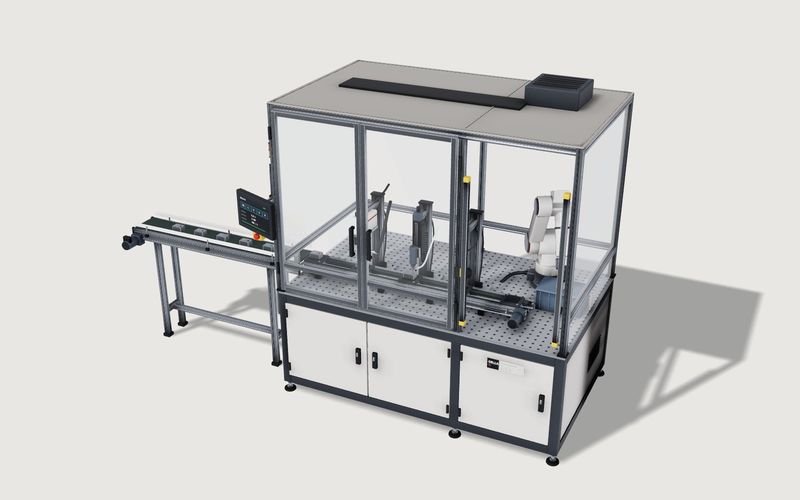
Own demo · fictional product
Modular automation cell
A fictional production cell with modules, robot and guarding: rules, placement in the hall, a running process and a parts list with example prices.
Every demo on modelwright.de is a fictional product built from our own geometry. The prices, checks and ratings in them are simplified examples, not quotes.
Which products suit a 3D configurator
A 3D configurator helps most where customers currently have to picture their product from photos and a list of options. That applies especially to:
- made-to-measure products or products with many variants, such as furniture, lighting systems, patio roofs or trade-fair stands
- systems with rules, where not every combination can be built, such as machine modules or bikes with accessories
- personalised products, where engraving, print or embroidery decides the sale
- technical products that sales teams and dealers have to explain without having the product with them
Our industries page shows how this looks across sectors.
Client case: ALUXIL, the 3D model next to the price
ALUXIL GmbH makes aluminium patio roofs and carports and sells them directly on aluxil.de. Since 16 September 2026 every product page there shows the system in 3D: three systems with 152 combinations of size, bracket, roofing and colour. The model has no buttons of its own. It follows the existing buy box, so it can never contradict the price. Four explainer views come with it: labels and dimensions, an exploded view, the drainage path through the posts, and the roof in the evening. The configuration images in the product gallery are rendered from the same model. The full story is in the ALUXIL case study.
What's included
The fixed-price quote spells out exactly what you get. It usually covers:
- the 3D model of your product, built from your materials
- the agreed options, rules and views
- controls that match your site, or none at all if your shop drives the configurator, as at ALUXIL
- a preview image or video that the page shows until the 3D starts
- review rounds via a private link on your own devices
- go-live as a standalone page or inside your website, with hosting and updates if you want them
Depending on the project we also set up enquiries by e-mail or webhook, your pricing rules, extra languages and analytics events. We do not currently offer an AR view in your room, an editor for maintaining products yourself, PDF quotes and CPQ, or ERP integrations as standard. If you need one of these, we assess it case by case and tell you honestly whether it makes sense.
How the project runs
- Conversation: what should a visitor understand, compare or choose? From that we suggest the right solution.
- Materials: you send photos, dimensions, drawings or samples, plus CAD data if you have it. We check what is usable before we start.
- Model and features: we build your product in 3D and implement exactly the features we agreed.
- Review: you test it via a private link on your own devices, and we revise.
- Go live: the configurator launches as its own page or embedded in your website or shop.
What data we need
- Geometry: photos from every side, dimensions and drawings are usually enough. CAD or 3D data can speed things up if it suits the web. Common formats such as STEP or IGES and native exports from your CAD system can work; we assess what is usable per project.
- Materials: colours, finishes, and physical samples if you have them.
- Options and rules: which variants exist, and which combinations aren't allowed? A spreadsheet is fine.
- Prices and article numbers, if the configurator should show a parts list or a price.
How pricing works
We don't publish a flat price, because scopes vary a lot. A product viewer is a small project. A configurator with rules, many variants and dealer embeds is a bigger one. The price mainly depends on the number of options and products, the rules, the parts-list and pricing logic, the explainer views and the type of integration. After the first call you get a fixed-price quote for the build and, if you want, for hosting and updates.
Integration: standalone page, website or shop
The configurator can be linked as its own page or embedded in your website with a short snippet, whatever your CMS. It can also sit next to the price on the product page and follow the shop's selection, as at ALUXIL. There, every file is served from the client's own server: no third-party requests, no cookies, and therefore no entry in the consent banner.
Load time: preview first, 3D second
Real 3D costs processing time, so ours doesn't load with the page. The page first shows a preview image or a short video, and the 3D starts when the visitor opens it. Devices without 3D support keep the preview image. After this change the demo pages we measured scored 99 to 100 in a lab measurement (Lighthouse 12.2, emulated phone and desktop, October 2026). No real phones were tested. Those scores measure page load; starting the 3D still takes processing time afterwards, which we have also only measured in the lab with emulated mobile devices.
Confidential from day one
Only you see your files and work in progress, through private links. Client work appears in our gallery only with explicit permission. Concept studies we build for prospects using their own product stay private.
More examples
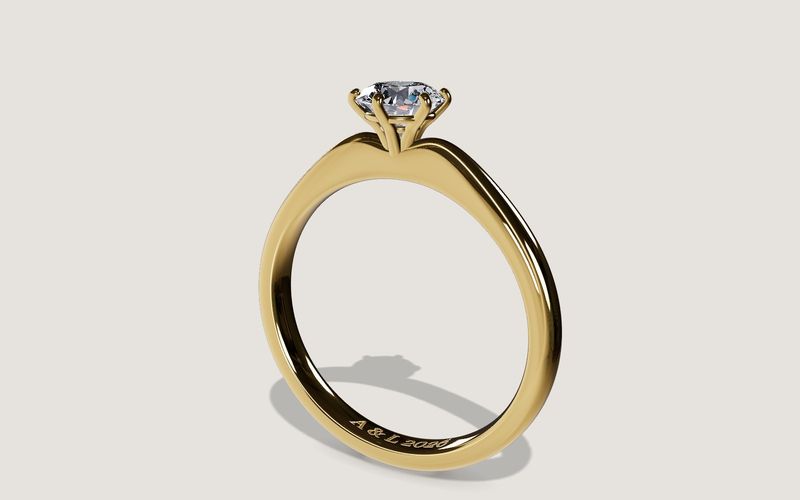
Own demo · fictional product
Solitaire ring
An engagement ring with setting, stone and engraving, in your choice of metal, stone and size.
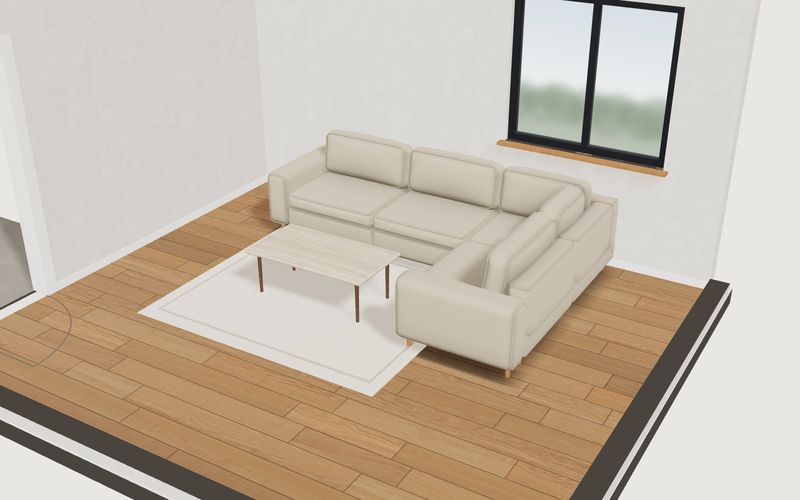
Own demo · fictional product
Modular sofa in your own room
Plan a modular sofa in your own room: room size, walkway and door are checked, and the plan view shows every dimension.
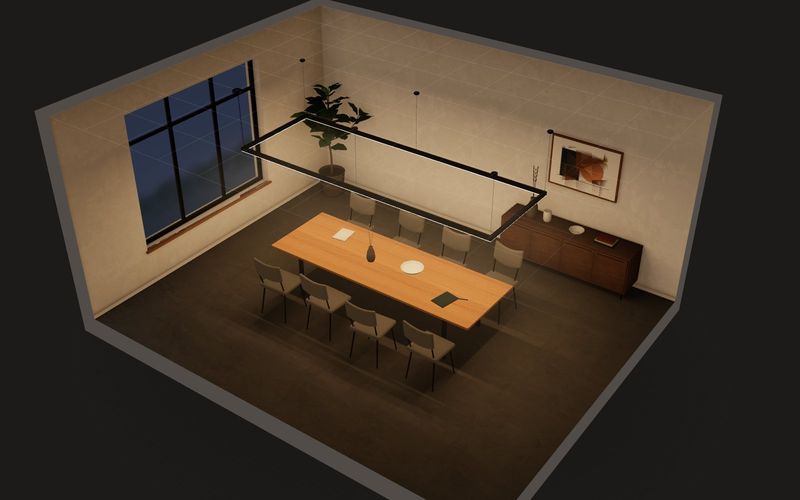
Own demo · fictional product
LUMA LINE linear luminaire
A lighting-system configurator where light itself is the product: draw runs on the ceiling grid, pick optic and colour temperature, and see light cones, lux values, checks and the parts list live.
See all solutions under services and all demos under examples.
Frequently asked questions
How much does a custom 3D configurator cost?
It depends on the scope: options, rules, parts list, number of products and integration. After the first call you get a fixed-price quote.
Off-the-shelf software or a custom build?
If an off-the-shelf tool covers your product, it may be the simpler choice. A custom build pays off when your product needs its own rules, checks or views that a template can't handle.
Do we need CAD data?
No. Photos, dimensions and drawings are usually enough. We use existing CAD data if it suits the web, and we check that before we start.
Will the configurator work in our shop?
It can be linked as its own page or embedded with a short snippet, whatever your CMS. Whether and how the selection is passed to your cart or an enquiry is defined in the quote.
Do you offer AR or ERP integration?
Not as standard. Enquiries by e-mail or webhook are set up per project. AR and deeper integrations we assess case by case.
How long does a project take?
That depends on the product and the features. We give you the timeline together with the fixed-price quote.