Outdoor structure configurators: enquiries, dealers and sales routes
How configurators for glass rooms, pergolas, carports, pool enclosures, shelters, canopies and louvres produce enquiries that dealers and sales can use.
Short answer: with covered outdoor structures, a configurator almost never ends in a basket. It ends with a dealer who measures up, a procurement officer who writes a specification, or an architect who fits the product into a facade. It works when the enquiry contains exactly what that next person needs. Our seven example configurators show three levels of output for this: a picture, a summary, and an enquiry with checks.

Which sales routes exist for outdoor structures?
There are three, and each needs a different enquiry.
- Homeowners through a dealer or installer. Glass rooms, pergolas, carports and pool enclosures are mostly bought by homeowners. The dealer or installer visits to measure, checks the wall connection, ground and access, and then quotes. The enquiry should prepare that visit, not replace it.
- Public and commercial buyers. Cycle shelters, waiting shelters, bin stores, school canopies and shade sails are bought by councils, schools, housing providers and businesses. A committee decision, a grant or a tender often sits between enquiry and order. The enquiry has to fit into a file.
- Architects and facade designers. External louvres and brise-soleil are settled early in a building's design and tendered later through the specification. The enquiry is a technical conversation with the manufacturer.
Before you commission a configurator, decide which route is your main business. Required fields, the views in the PDF and the recipient all depend on it.
What do the seven examples produce today?
All seven demos are Modelwright example configurators with fictional products and example values. No manufacturer ordered or reviewed them. Their output is deliberately developed to different levels:
| Example | What comes out at the end | Level |
|---|---|---|
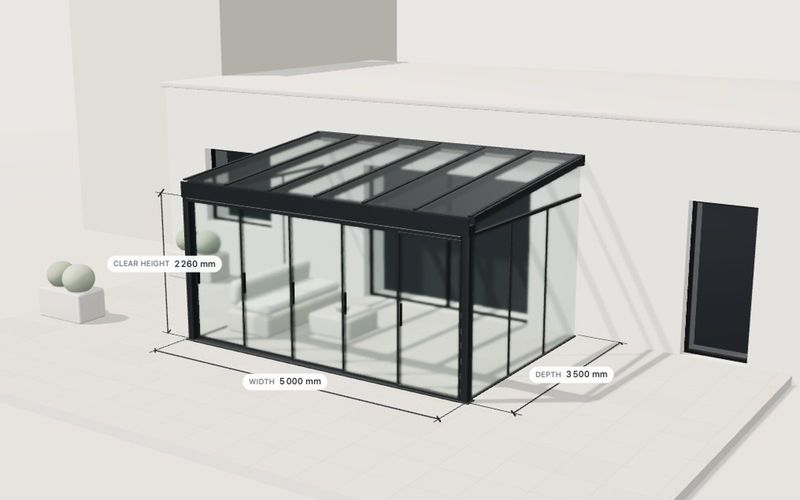
| Glass room | A summary without prices that recalculates with every change; save an image | Summary |
| Pergola | A summary without prices; save an image; controls in English | Summary |
| Carport | A 3D model with dimensions and a structure view; no summary, no enquiry, no price | Picture |
| Pool enclosure | Copy the enquiry text and a PDF quote sheet; a fictional sample budget band per area; a pool fit check | Enquiry with checks |
| Modular shelter | Live capacity, fit checks with a fix, enquiry text and PDF | Enquiry with checks |
| Canopy and shade | Summary with checks and a shade table, enquiry text and PDF | Enquiry with checks |
| Brise-soleil and louvres | Review with example checks, enquiry text and a PDF with outside and profile views | Enquiry with checks |
For the sales route this means: a picture is enough to show in a sales conversation what a carport with a storage room looks like. A summary is enough when the dealer measures on site anyway. Where buyers decide on their own, or have to fill a file, you need the enquiry with checks and a PDF.
What belongs in the enquiry for each route?
Homeowners through dealers
- Every dimension and the setting: freestanding or against the house, and the pool size for pool enclosures
- The chosen finish, glazing or roofing and side elements
- The postcode, so the enquiry reaches the right dealer
- Photos of the terrace or driveway as attachments (not in any demo; a project requirement)
Public and commercial buyers
- The number people buy: cycle spaces, bins, seats or the share in shade
- Site or project name, contact and preferred timing
- Several items in one enquiry for several sites (not built in the demos)
- A PDF with a view that can go into a committee paper
Architects and facade designers
- Facade grid, window height, gap to the facade, profile, blade spacing and drive
- Orientation and site for the sun check, clearly marked as an example calculation
- Profile and outside views in the PDF, so the designer can place the detail
What is built, and what would be project work?
Built into the demos
- The same rows everywhere. For the shelter and the canopy, the summary, enquiry text and PDF were identical in our checks; we tested German with metres and English with feet and inches. The user chooses the unit.
- Enquiry in the browser. In the shelter and the canopy, the enquiry text and the PDF are created in the browser and not sent. Where usage events are counted, only the names of the controls used are recorded, never what was typed; we checked this for these two demos.
- Checks in the enquiry. For the canopy, the result of the height check and the shade table are in the enquiry text; for the louvres, the example checks.
Proposed for your project
- Delivery by email or webhook to your sales team. This is part of our usual project scope; in the demos it is switched off.
- Routing to the right dealer, by postcode for example. Not built in any demo; we assess it per project, depending on how your dealer network receives leads today.
- CRM hand-over is assessed case by case. ERP integration, quote PDFs with binding prices and CPQ are not part of our standard offer.
- Several items and photos in one enquiry, as above.
For a comparison of template software and custom builds in this market, and what a dealer-ready enquiry carries, see configurator software for shed, garden room, carport and pergola makers.
Who answers loads, foundations and permission?
With covered structures, nearly every enquiry comes with a question the configurator must not answer: will the roof hold on this site, what foundation does it need, is permission required? Structure, foundations and site-dependent loads are designed by the manufacturer and their structural engineer. Whether permission is needed is for the client to settle with the local authority. A configurator can collect the details needed for this, such as postcode and setting, and say who decides. The library pages of the carport, shelter, canopy and louvre demos state explicitly that their values are not a structural design; the canopy demo repeats the note in its checks.
How do checks qualify enquiries without putting people off?
A red check can stop an enquiry or improve it. Our examples aim for the second:
- In the shelter, a check says the bikes stick out beyond the roof edge, and "Make it fit" sets the depth needed.
- In the canopy, the clear height turns red when it is below the buyer's requirement, and the enquiry states both values.
- In the louvre demo, the configurator suggests a larger blade spacing when rotating blades sit too close.
- In the carport, adding a storage room raises the depth to at least 6.8 m automatically instead of showing an error.
For your sales office, an enquiry with a known problem is worth more than one with a wrong assumption: they know what to raise first on the call or the site visit, and the buyer has already seen the limitation before a quote is written. All checks use example values; the rules for your product are yours to set.
Basket or enquiry?
A basket only fits where sizes and installation are standard, such as carport kits in fixed sizes for self-assembly. Once something is measured, tendered or designed, an enquiry is the more honest close. A price range can still manage expectations: the pool enclosure shows a fictional sample budget band per area, clearly labelled as an example. The other six demos show no prices.
The seven examples
Own demo · fictional product
Glass room configurator
A complete configurator for a fictional glass room: size, sliding front, roof glazing, frame colour.

Example configurator · fictional product
Pergola with three roof types
A pergola: width and depth, roof in glass, louvres or panels, louvre angle, frame colour and side elements.

Example configurator · fictional product
Carport configurator
A carport: single or double, width, depth and clearance height, timber, steel or aluminium, roof shape, walls and storage room – with dimensions and the structure.

Example configurator · fictional product
Retractable pool enclosure configurator
Plan a retractable pool enclosure: free-standing or lean-to, width, length in bays, wall height, doors, windows and motor – with a pool fit check, an opening animation and a PDF enquiry.

Example configurator · fictional product
Modular shelter configurator
A modular shelter for bikes, waiting passengers, smokers or bins: choose the use, set bays, depth and height, pick roof, walls and fit-out – with live capacity, fit checks and a PDF enquiry.

Example configurator · fictional product
Canopy & shade structure configurator
Plan a canopy for a school, walkway, entrance or play area: choose the roof type, size, bays, roofing and colour – then move the sun and see how much shade it casts, and when.

Example configurator · fictional product
Brise-soleil & louvre configurator
Plan facade louvres: choose horizontal or vertical blades, profile, depth, spacing, fixed or motorised rotating blades, mounting and finish – then move the sun with the sun-path slider and see the shadow travel across the glass and the share of the window shaded (example calculation).
Next step
Write down who receives your enquiries today, which details are missing at first contact, and what is checked first on a site visit or in a tender. Those three lists give you the fields of the enquiry. How geometry, the sun check, units and phones are handled technically is covered in implementing outdoor structure configurators. For what drives the price, see what a 3D configurator costs; for hiring us, custom 3D configurator development. After the first email exchange you get a fixed-price quote.
Frequently asked questions
Does the configurator replace the site survey?
No. It prepares it: the enquiry carries dimensions, setting and check results that are confirmed on site.
Can the enquiry go straight to the right dealer?
Technically yes, by webhook with a postcode lookup for example. It is not built into our demos; we assess it per project.
Should we show prices in the configurator?
That depends on the route. For kits a price can make sense; for project work a clearly labelled price range or no price at all is usually better.
Sources
- Demo features: the "Live in this demo" lists on each library page, read 14 November 2026: modelwright.de/en/library/
- Modelwright, custom 3D configurator development, scope of service, read 14 November 2026: modelwright.de/en/3d-configurator/
Read next

Yurt configurator software for yurt and glamping makers
What a 3D yurt configurator needs: diameter, doors and windows placed around the lattice wall, fabrics, stain, options, a site check and an enquiry.

Yard ramp configurator for manufacturers: features, benefits, implementation
What a 3D configurator for mobile yard ramp makers must do: length, bed height, forklift slope, checks, options and an enquiry with a PDF.

Wood-fired hot tub configurator software for hot tub makers
What a 3D configurator should do for wood-fired hot tub makers: stove type, size, cover, lighting, accessories, a running price and an enquiry.