3D viewer for cosmetic packaging: bottle, closure and label in the browser
How cosmetics brands and primary packaging suppliers use a 3D bottle viewer: combine glass, content, closure and label live, for the shop and for sales.
Short answer: a 3D viewer for cosmetic packaging shows a bottle so that glass, content, closure and label can be combined live. For a cosmetics brand it replaces part of the per-variant photography on the product page; for a supplier of bottles, closures or labels it makes the range combinable in sales conversations. It is most useful where material and light carry the decision: glass, metal and finishing.
This guide is for marketing and e-commerce leads at cosmetics and skincare brands, for sales teams at primary packaging manufacturers and distributors, and for agencies that design packaging.

Who gets value from a 3D cosmetic bottle viewer?
Two groups use the same model with different goals:
| Cosmetics brand | Bottle and closure supplier | |
|---|---|---|
| Who looks | Shoppers in the brand's store, retailers, press | Brand purchasing and product development, agencies |
| What is shown | The finished product in its variants | Combinations of bottle shape, glass, closure and finish |
| Goal | A product page with real material and light, fewer photos per variant | Show combinations before samples are ordered |
| Outcome | A purchase | A sample request or quote request |
For the brand the viewer is part of the product page. For the supplier it is a sales tool: its buyers are brands that assemble their product from stock bottles, closures and finishes. How both paths end, in approval, sample request or shop, is covered in packaging in 3D: approval, samples and sales.
Why are cosmetic bottles a good case for real-time 3D?
With a cosmetic bottle the impression comes from light: glass refracts and reflects, the content tints the light, and a brushed metal closure reflects differently from a matte one. A photo captures that for one combination. With three glass types, four content colours, two closures in four finishes and two label types, as in our demo, that is already 192 combinations before any change of shape. A real-time viewer renders each combination at the moment it is chosen.
Where rendered stills are still the better choice, for campaigns and print, and where an interactive viewer wins, is explained on our 3D product viewer page. Product images per variant can also be produced from the same 3D model; that is project work, not part of the demo.
What does our example configurator show?
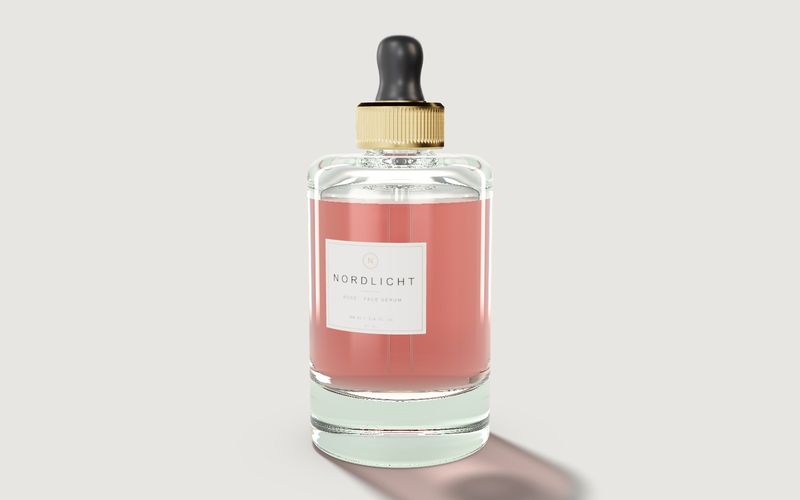
Our example configurator shows a serum bottle of a fictional brand. Shape, dimensions and options are example values; no manufacturer commissioned or reviewed the demo. Live in the demo:
- Shape: round or square, with a smooth morph between them.
- Glass: clear, frosted or amber, with refraction traced live.
- Content: four colours (rosé, amber, clear, sage), seen through the glass.
- Closure: dropper or cap, each in four finishes (brushed gold, matte black, oak, gloss white).
- Label: paper with gold foil, or screen print straight on the glass; the brand name is free text.
- Open: the closure unscrews and moves beside the bottle.
- Info points on the glass base, closure and label.
Which dependencies link these options is covered in cosmetic bottle configurator: options and dependencies.
Example configurator · fictional product: Cosmetics bottle – choose shape, glass, content, closure and label, type a brand name, unscrew the closure.
What does it deliver?
We do not promise metrics. You can check the benefit at these points:
- For the brand: variants do not each need a photo shoot to appear on the product page. A new content colour or closure is added as an option.
- For the supplier: a brand's buyer can combine glass, closure and finish before asking for samples, so your sales team discusses a concrete selection.
- For the agency: a label design can be shown on the real bottle shape rather than flat.
Which questions should you settle first?
- Product page or sales tool? A brand's product page needs the finished variant and a short load time. A supplier's sales tool needs the breadth of the range.
- How many bottle shapes? Shapes described by the same dimensions can morph into each other. Very different shapes are built as separate models.
- Which combinations do you not supply? A closure that only fits one neck finish is a rule the configurator must know.
- Who adds new variants? A new content colour or finish is a data entry; a new bottle shape is modelling work.
Where are the limits?
- No product claims. The demo makes no statement on material suitability, compatibility with formulations, tightness or recyclability. The manufacturer is responsible for those statements, not the viewer.
- Colour is not binding. Glass and content look slightly different on every screen. The physical sample remains binding.
- Rendering load. Real refraction in glass is demanding for the graphics chip. For weaker devices a project needs a simpler rendering, or a poster image shown until the 3D starts.
How does a project run?
- Scope: which bottle shapes, glass types, closures and finishes, and whether a viewer is enough or combination rules are needed.
- Data: technical drawings or CAD of bottle and closure, photos of samples, label layouts.
- Model and materials, with glass, content and finishes.
- Review via a private link.
- Go live as its own page or by snippet in your website or shop.
What drives scope and cost is explained in what a 3D configurator costs. How we build viewers and configurators: custom 3D configurator development.
Frequently asked questions
Can you model the stock bottles from our catalogue?
Yes, from technical drawings or CAD data. We check before the start whether the data is suitable for the web.
Will it run in our shop?
It can be embedded as its own page or by snippet, independent of the shop system. The link to shop variants is settled in the project.
Sources
- Demo features: the "Live in this demo" list on the Cosmetics bottle library page and the demo source code (bottle.js: options, finishes, info points), read 14 November 2026
Examples to try
Own demo · fictional product
Cosmetics bottle
A serum bottle with glass, content, cap and label: for design reviews, the shop and sign-off.
Read next

Yurt configurator software for yurt and glamping makers
What a 3D yurt configurator needs: diameter, doors and windows placed around the lattice wall, fabrics, stain, options, a site check and an enquiry.

Yard ramp configurator for manufacturers: features, benefits, implementation
What a 3D configurator for mobile yard ramp makers must do: length, bed height, forklift slope, checks, options and an enquiry with a PDF.

Wood-fired hot tub configurator software for hot tub makers
What a 3D configurator should do for wood-fired hot tub makers: stove type, size, cover, lighting, accessories, a running price and an enquiry.