Packaging in 3D: design approval, sample requests, retail and shop
How 3D views of cartons, bottles, cans and fragrance sets work in sales: approval with brand and agency, sample requests, retail buyers and the shop.
Short answer: with packaging, a 3D view rarely ends in a basket. It usually ends in a decision: a design is approved, a sample is requested, or a flavour range is shown to a retail buyer. A packaging view works in sales when it ends with a clear selection someone can act on, and when everyone understands that it prepares the proof or sample rather than replacing it.
This guide is for sales and marketing leads at packaging manufacturers, printers and brands. It sets out where a selection from a 3D view can go, what our four packaging demos show today, and what would be project work. Manufacturer-specific starting points: folding cartons, cosmetic bottles, beverage cans and perfume bottles.

Which sales paths can a packaging view serve?
The same 3D model can serve three very different paths. Decide which one you mean before building, because each needs a different result.
| Path | Who looks | What must be there at the end |
|---|---|---|
| Manufacturer to brand | A brand's purchasing, product development and agency | A sample or quote request with an unambiguous selection |
| Approval inside the brand | Marketing, product management, agency, management | Approval, or a list of changes, for a specific design version |
| Brand to retail and shoppers | Retail buyers, shoppers in the brand's store | A listing meeting, or a purchase of the selected variant |
The first two paths are business to business and suit private links. The third is public and belongs on the website or in the shop.
How does a 3D view help with design approval?
Packaging designs pass through many hands: agency, marketing, product management, often purchasing and management too. The usual material is PDFs of the wrap or dieline, renderings and, at the end, a proof or sample. A 3D view sits between the flat file and the sample:
- Everyone sees the same thing. One link opens the same pack with the same design, in a browser, with no special software.
- Shape questions surface early. Where the logo sits after folding, how a motif runs around the can, how the label looks on a square bottle: all of that is settled before the press proof.
- The binding check stays with the sample. Colour, material and finishing are judged reliably on the proof or sample. A 3D view does not replace that and should not claim to.
For approval, the version is what counts. Whoever approves must know which state they are approving. A simple, robust way is a separate private link for each design version, with a date or version number visible in the view. Comments or approval status inside the viewer would be software of their own, which we assess case by case; many teams manage with link plus email, or with the approval tool they already use.
What belongs in a sample request from a 3D view?
When a packaging manufacturer uses a view in sales, the useful result is usually a sample request. It should be complete enough for your inside sales team to act without calling back. The fields differ by product type:
| Product | Fields that make a sample request complete | Available as options in the demo |
|---|---|---|
| Folding carton | Style, size, board, inks or layout version, finish, embellishment, quantity range | Board, print colour, finish, logo embellishment, product name |
| Cosmetic bottle | Bottle shape and fill volume, glass type, closure and finish, label or print type | Shape, glass, content, closure, finish, label, brand name |
| Beverage can | Format, design version per flavour, varnish, pack | Flavour, varnish, condensation, pack |
| Fragrance set | Bottle, cap and finish, box, label or personalisation | Liquid colour, finish, label name |
Quantities, dates and a contact person are always added. How configurator enquiries are routed in general is covered on our 3D configurator page.
How does sales tell serious requests from curiosity?
A packaging view is engaging, so people also use it out of curiosity. For a manufacturer it is worth asking a few questions in the request that place the need without putting people off:
- New pack or a changeover? A changeover often has fixed sizes and dates; a new development has more open points.
- Quantity range, as a rough choice rather than a mandatory exact number.
- Time frame to market launch.
- Role of the requester: brand, agency or retailer.
With these details, inside sales can decide whether a sample, a call or a quote comes first.
What do the demos show today, and what would be project work?
All four demos are example configurators by Modelwright with fictional products and example values. No manufacturer commissioned or reviewed them. For the sales path it matters to separate exactly what they can do.
Implemented in the demos
- Viewing variants and states: every option in the table above, plus folding, opening, unboxing and the exploded view, depending on the demo.
- Fixed start states by link: for the beverage can and the perfume bottle, the embed accepts a link parameter for prepared states, such as the 6-pack, the open can, the unboxed set or the exploded view. For the folding carton and cosmetic bottle this is not provided in the demo.
- Info points on the model: the folding carton and the cosmetic bottle explain single details directly on the model, such as the crease or the glass base.
Not implemented: set up per project or assessed case by case
- Summary and enquiry: none of the four demos has an enquiry form or a summary of the selection. The enquiry on the library pages is a project enquiry to Modelwright, not a sample request for the product shown.
- Sharing a freely chosen state as a link: no demo can save a self-assembled variant as a link.
- Comments and approval status inside the view, assessed case by case.
- Hand-over to shop or CRM: we set up enquiries by email or webhook per project; deeper integrations are assessed case by case.
- Product images per variant from the same 3D model, for the shop and presentations.
What changes when the view goes public?
- Approved designs only. Unreleased flavours or drafts stay on private links, not on the website.
- Choose the start state on purpose. For retail, the multipack may matter more than the single can; for the shop, the finished variant the shopper can order.
- Map variants to the shop. Every selection in the view must match a shop variant, or shoppers order something other than what they saw.
- Load time. In public every second counts. How the view stays light is covered in implementing packaging in 3D.
Which demo fits which path?
Own demo · fictional product
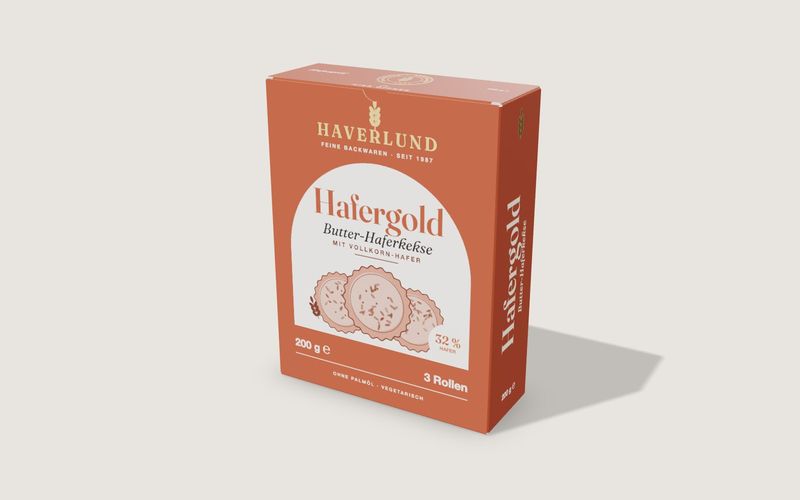
Folding box
A tuck-end carton from flat dieline to open box, with real board thickness, creases, print and finishing.
The folding carton fits the manufacturer-to-brand path best: it explains construction and finishing and prepares a sample request.
Own demo · fictional product
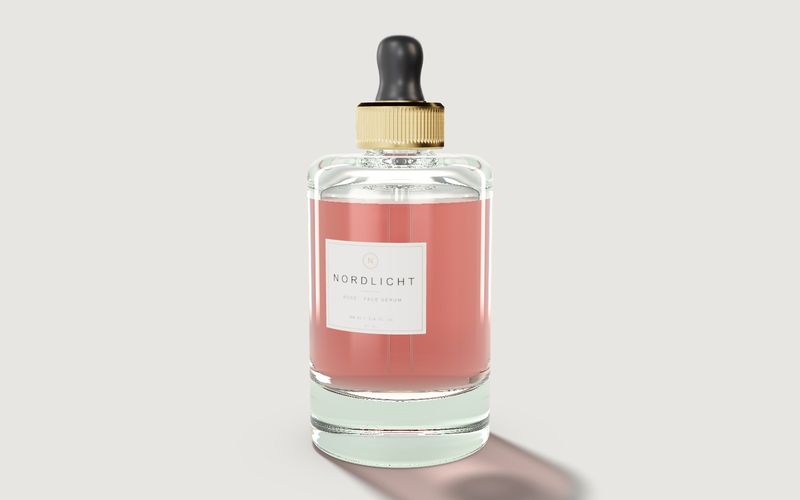
Cosmetics bottle
A serum bottle with glass, content, cap and label: for design reviews, the shop and sign-off.
The cosmetic bottle serves two paths: the sales tool of a packaging supplier showing combinations from its range, and a brand's product page.

Example configurator · fictional product
Beverage can 330 ml
A beverage can with three flavour designs, matt or gloss finish, condensation, single can, 4-pack or 6-pack – to turn and open.
The beverage can fits approval of a flavour range inside the brand and the conversation with retail, with packs as fixed start states.

Example configurator · fictional product
Perfume bottle and box
A perfume bottle with box: glass colour, cap, label with your own name, open and unpack the box – with an exploded view.
The perfume bottle and box fits a brand's product page, especially when a personalised label is offered, and alignment between bottle and box suppliers.
Frequently asked questions
How do unreleased designs stay confidential?
Through private links that only the people involved know. A view becomes public only when you embed it on your website or in your shop.
Can the 3D view replace the proof?
No. On-screen colour depends on the device, and materials and finishes are a rendering. Proofs, press proofs and samples remain binding.
Where does an enquiry from the view go?
By email or webhook to the inbox or system you choose. Whether a CRM connection is needed as well is clarified in the project.
Scope and cost: what a 3D configurator costs.
Sources
- Demo features: the library pages for the folding box, cosmetics bottle, beverage can and perfume bottle, and the demo source code (box.js, bottle.js, can.js, perfume.js, embed), read 14 November 2026: example configurators
- Service scope (enquiries by email or webhook, private review links, quote documents, CPQ and ERP not standard): Modelwright, custom 3D configurator development, read 14 November 2026
Examples to try
Own demo · fictional product
Folding box
A tuck-end carton from flat dieline to open box, with real board thickness, creases, print and finishing.
Own demo · fictional product
Cosmetics bottle
A serum bottle with glass, content, cap and label: for design reviews, the shop and sign-off.
Read next

Yurt configurator software for yurt and glamping makers
What a 3D yurt configurator needs: diameter, doors and windows placed around the lattice wall, fabrics, stain, options, a site check and an enquiry.

Yard ramp configurator for manufacturers: features, benefits, implementation
What a 3D configurator for mobile yard ramp makers must do: length, bed height, forklift slope, checks, options and an enquiry with a PDF.

Wood-fired hot tub configurator software for hot tub makers
What a 3D configurator should do for wood-fired hot tub makers: stove type, size, cover, lighting, accessories, a running price and an enquiry.