Building configurators for trade fair and event structures: grids, states, setting, branding, care
Technical decisions for stand, bleacher, flagpole, kiosk and stage configurators: geometry from grids, animation, site context, logos, phones, upkeep.
Short answer: configurators for trade fair and event structures are best built from grids and tables rather than a finished model per variant: walls, seating rows, rows of poles, counters and stage decks are generated from a few dimensions. Three things matter more here than elsewhere: two states of the product with an animation between them, a setting that shows the site, and the buyer's brand on the model. All the buyer needs is a browser, on a computer or a phone.
This guide is for product managers, technical and marketing leads at stand builders and at makers of bleachers, flagpoles, kiosks and mobile stages. We use five Modelwright example configurators with fictional products and sample values: the EXPO GRID stand planner, the bleacher configurator, the flagpole configurator, the retail kiosk and cart configurator and the mobile stage trailer configurator. The product rules are covered in the guides on each example; this one stays with the technology.

Finished models or geometry from grids?
The products in this group are made of repetition. A system stand consists of posts, beams and wall elements on a grid, a kiosk of counter runs, posts and headers, a stage of body, wings and stairs. Building a separate model for every size would be unaffordable when stands range from 3 × 3 to 10 × 6 m or kiosks change in 20 cm steps. So the geometry is generated from dimensions.
Our examples show two ways of doing it. In the stand planner, the parts (profile, counter, lounge, LED wall, truss) are modelled once and assembled on the grid; every repeated part is drawn as an instance so that even large stands stay smooth. In the kiosk and the stage, the geometry is created directly in code from the dimensions in the data file. Both work; the first pays off when your parts have a distinctive look, the second when the shape follows mainly from dimensions.
Your CAD data helps with parts that always look the same, such as profiles, fittings or pole heads. The route from CAD files to a light web model is explained in CAD to web 3D configurator. In the browser we use glTF, an open, royalty-free standard from the Khronos Group [1].
Two states and the animation between them
Almost every product in this group has two states: the stage arrives as a trailer and then stands as a stage, the kiosk is open by day and locked at night, the flagpole carries its flag aloft or is lowered for maintenance. The animation between the states is not decoration here; it explains the product.
- In the stage, a slider steps through the set-up phases and plays both ways. Change the deck wings or the roof after the stage is up and the relevant part of the set-up replays briefly so you can see what changed.
- In the kiosk, "Close" rolls down shutters or folds lids shut, padlocks engage and the lights go off.
- In the flagpole, the demo shows hoist, wind, tilt and night [2].
For implementation this means each state must be right for every configuration, and the dimensions of both states belong in the readout, for the stage road size and footprint. When the operating system is set to reduce motion, the kiosk and stage demos skip camera moves and transitions and jump straight to the target state.
How do you show the site?
In this group the buying decision depends on the site, so the site has to be visible. The examples use five settings: an exhibition hall with neighbouring stands as neutral blocks and aisles, an example mall walkway with queuing zones and shopfronts without names, a site with an outline, a building behind the row of poles, and a site with a working margin. Scale figures make sizes tangible. The setting is deliberately plain and neutral so that it shows no third-party brand and does not distract from the product.
Checks against the site should be calculated from the same data as the model. In the kiosk, clear passage follows from the same footprint that builds the model; in the stage, the space needed follows from the same dimensions as deck and stairs. Picture and text cannot drift apart. The result appears on the model and as a sentence in the summary; the sentence is the authoritative form because it ends up in the PDF.
The buyer's brand on the model
With stands, kiosks, flags and banners, the buyer is buying visibility. The stand planner draws brand name, colour and an uploaded logo live onto wall prints, counter and LED wall. Technically, a graphic is created in the browser and applied to the model as a texture. The logo stays in the browser; the demo accepts only image files up to 8 MB and scales them down before drawing.
For your project three questions need answers: which file formats are accepted, whether the logo travels with the enquiry, and who may see it. An uploaded logo is the buyer's file. If it is sent, it belongs in the privacy notice and in your sales process. Kiosk and stage deliberately show header and banners without a logo; there an upload would be a project requirement.
Units and languages
The examples show how varied this can be: the bleacher demo is in English and switches between ft/in and mm, the flagpole demo is in German, and kiosk, stage and stand planner run in German and English [2]. For your project, another language or unit is more than translation: it runs through input fields, check texts, enquiry and PDF. We recommend storing dimensions once in millimetres and converting only for display.
Phones and loading
On our library pages the 3D model starts once the page has loaded on a desktop computer, and only after a tap on phones and tablets. In an independent review, the kiosk and stage demos drew nothing while idle, and after a loss of the graphics context the view recovered; all tests were emulated, not on physical devices. Anyone showing the configurator on a tablet at a stand or at an organiser's office needs a model that loads quickly and spares the battery. So the model should redraw only when something changes, and many identical parts such as posts, seating rows or figures should be batched.
Accessibility and privacy
Someone who cannot see or operate the 3D view still needs to be able to configure. In the kiosk and stage demos every choice is made with controls next to the 3D view, and every check result appears as a sentence in the review. The W3C's WCAG 2.2 is the usual guideline for web accessibility [3].
In the kiosk and stage demos, entries are neither sent nor stored; only which features are used is counted, never the content. If your configurator later sends enquiries by email or webhook, we agree beforehand which fields are needed and who receives the data.
Upkeep after launch
In this group, hire rates and packages may change with the season, modules and colours with the range, and defaults for aisles or sites with your team's experience. In the stage demo, every value a manufacturer would replace sits in a separate data file. We keep that split in projects too: your product management reads and approves the tables, the logic stays in code. An editor for maintaining it yourself is not part of the standard. New prices or colours are handled in the monthly care; new modules or series are quoted separately.
For acceptance, write down test cases from your daily work: a standard case, an edge case and a conflict, such as a module that no longer fits on the space. They belong in the specification, together with the expected result of each check.
Next step
Which of these points drive the price, and what three typical cases cost over three years, is covered in trade fair and event structure configurators: cost and procurement. How a project runs with us is shown under 3D configurator development.
Frequently asked questions
Do we need CAD data?
Not necessarily. For everything generated from dimensions, grids, tables, drawings and photos are enough. We use CAD files for parts with a fixed look if they suit the web; we review that before the start.
Does it run at a show without internet?
Not as standard. If your stand team has to work offline, we discuss it in the project.
How does it get onto our website?
As its own page or embedded with a snippet, independent of your CMS.
Sources
- Khronos Group: glTF (read 14 November 2026): khronos.org/gltf
- Demo features and language notes: Modelwright library pages for the five examples, read 14 November 2026.
- W3C: Web Content Accessibility Guidelines (WCAG) 2.2 (read 14 November 2026): w3.org/TR/WCAG22
Examples to try
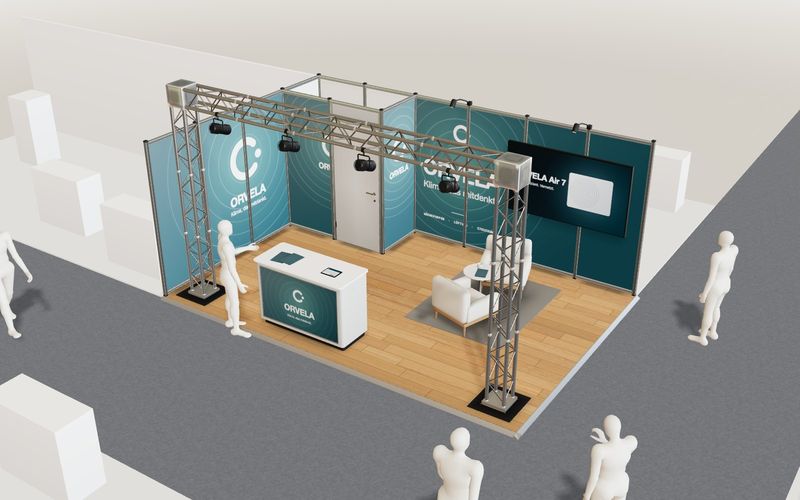
Own demo · fictional product
EXPO GRID trade-fair stand planner
Plan a system stand on the hall grid: pick type and size, place modules, put the brand on the walls live – with area, example price per m² and parts list.
Read next

Yurt configurator rules: placing doors and windows on the lattice wall
The rules a yurt configurator needs: wall length per diameter, the space each opening takes, a second door opposite, collision-free dragging, options.

Yard ramp slope, bed height and checks as configurator rules
How a yard ramp configurator calculates slope from length, level-off and bed height, and checks lift range, door opening and forklift clearance.

Wire partition planner rules: outline, doors and parts
The rules a wire partition planner needs: outline on a grid, wall lengths, heights, doors and service windows, ceiling and lock, layout checks and parts.