Furniture and interior configurators in sales: shop, showroom, dealers and contract projects
Where a furniture, interiors or hospitality configurator should end: basket, showroom visit, dealer or contract enquiry, and what each must contain.
Short answer: furniture and interiors are sold along four routes, and each needs the configurator to end differently. In an online shop it ends in a basket with a price; in a showroom or kitchen studio, in a saved plan the consultation picks up; with a dealer, in an embedded view and an enquiry routed to the right dealer; in contract work, in an enquiry with a plan, quantities and check results. Decide the route before choosing features: it sets which fields, prices and outputs the configurator needs.

Which sales routes matter for furniture and interiors?
The eight example configurators in this group cover the spectrum: a modular sofa in the buyer's room, a living room cut-away, a café floor plan, an office chair, a modular kitchen, a shelving system, booth and banquette seating, and a reception desk. All are example configurators built by Modelwright with fictional products and example values; no manufacturer commissioned or reviewed them. Each product leans towards a route:
| Route | Typical products | Where the configurator ends | What that requires |
|---|---|---|---|
| Online shop, direct to consumers or small firms | modular sofa, shelving, office chair, flat-pack kitchen units | basket | a price per version, article numbers, an unambiguous parts list |
| Furniture store, kitchen showroom | sofa, kitchen | saved plan, appointment | a plan the adviser can reopen or print in store |
| Dealer network | office chairs, kitchens, shelving | view on the dealer site, enquiry to the right dealer | embedding, dealer routing, perhaps dealer prices |
| Contract and hospitality projects | café fit-outs, banquettes, reception desks, office chairs in volume | enquiry with a plan | room sizes, quantities, check results, a PDF, a sample request |
Many manufacturers serve more than one route. Then one configurator with several endings beats several configurators: the same configuration ends with a price in the shop and as an enquiry in contract sales.
What should each enquiry contain?
| Product | Details that save a call-back | Implemented in the example configurator |
|---|---|---|
| Modular sofa | layout, modules, fabric, legs, room and door sizes, delivery check result | plan, module list and example price in the configurator; no enquiry |
| Living room (floor, paint) | chosen floor, wall tone, project or unit | view only; no enquiry |
| Café floor plan | layout, seat count, tables and chairs per model, finishes, room size | layouts with seat count; no enquiry |
| Office chair | version, quantity, samples wanted | view only; no enquiry |
| Modular kitchen | layout, length, fronts, worktop, preferred appointment | view only; no enquiry |
| Shelving | grid, front per bay, mounting, parts list | parts list without prices and the rules applied; no enquiry |
| Booth seating | layout, lengths, room depth, covers, aisle, cover material, number of seating groups | review with checks, enquiry text and PDF |
| Reception desk | shape, modules, workstations, space and reach checks, finishes, number of desks | review with checks, enquiry text and PDF |
The right-hand column is meant honestly. Only the two contract examples, booth seating and reception desk, have an enquiry flow with text and PDF today. The others end at the view or at an intermediate result such as a module list, a seat count or a parts list; the enquiry would be project work.
What is implemented, and what is project work?
Implemented in the demos
- Review, enquiry text, PDF: booth seating and reception desk list every value and check result, produce an enquiry text to copy with contact fields (including the number of seating groups or desks) and a two-page PDF with a 3D view and the plan. In our QA every review row appeared in the enquiry text and the PDF.
- Intermediate results: the sofa shows a dimensioned plan, a module list and an example price for a fictional brand; the shelving system shows a parts list without prices.
- Privacy in the preview: in the booth and reception desk demos, inputs are not sent; text and PDF are produced in the browser. When a demo is opened through a tagged link, only the names of the controls used are counted, never what was typed.
Proposed for your project
- Sending by email or webhook to your sales office, part of our usual project scope.
- Routing to a dealer or showroom, for example by postcode. Not in any demo; we check it per project, depending on how your dealers receive enquiries today.
- A basket with prices in an existing shop.
- Hand-over to a CRM, checked case by case. ERP integration, quote PDFs with binding prices and CPQ are not part of our standard offer.
- A saved plan for the consultation that an adviser reopens in the showroom. Not in any demo.
When does a basket fit, and when an enquiry?
A basket fits when every configuration has a fixed price and can be delivered without a survey: sofa modules, shelving bays, chairs, finished kitchen units. The configurator then needs pricing that covers every valid combination and a parts list your warehouse understands. Selling to consumers adds price-display and cancellation obligations in each market; check them with your legal adviser before launch.
An enquiry fits as soon as the room and the design decide: banquettes built for a wall, desks for a lobby, a café fit-out, a kitchen after survey. Here the price is a result of the design anyway. An example price can still steer expectations if it is clearly marked as a guide, as in the sofa configurator.
How do dealers and contract partners receive it?
- Your sales office needs the full configuration to check feasibility and prepare a quote.
- The dealer or showroom also needs location and contact to book an appointment. In office furniture, dealers often plan with industry data and their own software; a web configurator complements that rather than replacing it.
- The fit-out contractor or hospitality designer needs the plan: room sizes, aisle widths, seat count, workstations. A PDF with a plan is often worth more to them than any line of text.
Decide who receives the enquiry first and whether it travels on in the same form. That decides which fields are mandatory and what the PDF should show.
How does a configurator qualify without putting buyers off?
Checks carry information. In the sofa, the delivery check shows whether every module fits through the door width entered; in the booth configurator a too-narrow aisle turns red; in the reception desk, width per workstation turns green, amber or red, with a one-click suggestion. In the booth demo a red check does not block the enquiry; it is included as information. Your sales team gets an enquiry with a known issue rather than one built on a wrong assumption. All checks use example values; the rules for your product are yours to set.
A real project from the furniture world
How 3D runs on a firm's own site is shown by the project for the architecture and design studio QASTIC: an outdoor furniture system for Lutie Café, in 3D on the studio's project page since 30 October 2026, built from its Rhino files, with five scenes, four times of day and four single-piece views. The 3D supplements the existing page and starts only when clicked. Details are in the QASTIC case study.
Examples with an enquiry, parts list or exploded view

Example configurator · fictional product
Office chair configurator
An office task chair: mesh or upholstered back, covers, base, armrests and headrest – with adjustable seat height, synchro mechanism and an exploded view.

Example configurator · fictional product
Modular kitchen configurator
Plan a modular kitchen: single run, L-shape or with island, run length on a 60 cm grid, fronts, handles and worktop – with opening fronts and the carcass build-up.
Own demo · fictional product
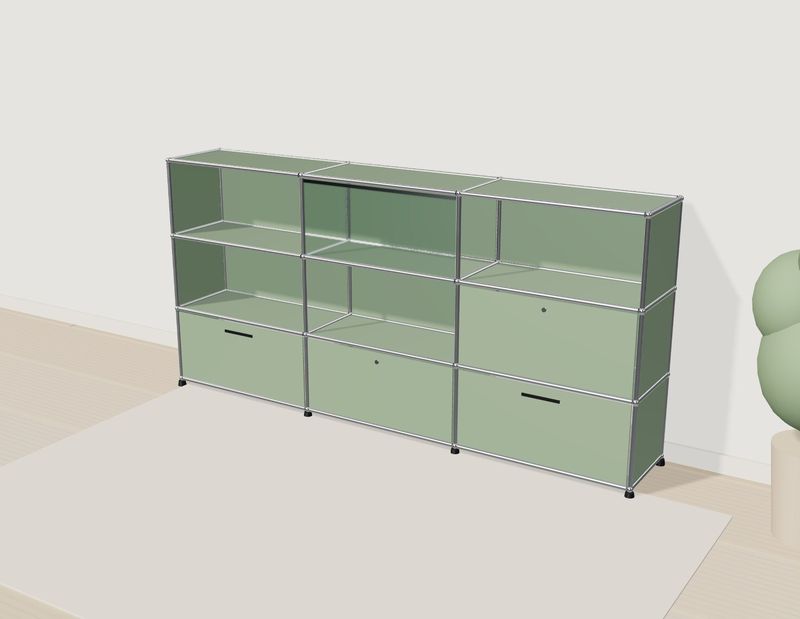
Shelving configurator
A modular shelf: change the grid, fronts and colours, or click a compartment in 3D. The parts list keeps up.

Example configurator · fictional product
Booth & banquette seating configurator
Plan restaurant banquettes and booths: choose layout, length, back and cover, and see in plan at once how many covers fit and whether the aisle stays wide enough.

Example configurator · fictional product
Reception desk configurator
Plan a reception desk: choose shape, modules, raised top and front, and see in the plan at once whether every workstation has enough space and reach.
Next step
Write down the routes you sell through, who receives an enquiry first, and which detail is most often missing on the first call. Those answers give the configurator's ending and its mandatory fields. Technical questions are covered in furniture configurator implementation, budget and buying in furniture configurator cost. How we build one for your range is described under custom 3D configurator development; after a first email exchange you receive a fixed-price quote.
Frequently asked questions
Do we need two configurators for shop and contract sales?
Not necessarily. The same configuration can end with a price in the shop and as an enquiry in contract sales. The logic stays one; only output and mandatory fields differ.
Can dealers see their own prices?
Technically yes, for example behind a protected login. That is not in any of our demos and adds scope, because prices and logins have to be maintained.
What happens to inputs in the demos?
In the booth and reception desk demos inputs are not sent. Enquiry text and PDF are produced in the browser; at most the names of the controls used are counted.
Sources
- Example configurator features: "Live in this demo" lists on the library pages for the modular sofa, living room cut-away, café floor plan, office chair, kitchen, shelving, booth seating and reception desk, read 14 November 2026: modelwright.de/en/library/
- Enquiry text, PDF and usage counting in the booth and reception desk demos: QA logs of 14 November 2026 (emulated devices).
- Modelwright: QASTIC case study, read 14 November 2026: modelwright.de/en/case-qastic.html
Read next

Yurt configurator software for yurt and glamping makers
What a 3D yurt configurator needs: diameter, doors and windows placed around the lattice wall, fabrics, stain, options, a site check and an enquiry.

Yard ramp configurator for manufacturers: features, benefits, implementation
What a 3D configurator for mobile yard ramp makers must do: length, bed height, forklift slope, checks, options and an enquiry with a PDF.

Wood-fired hot tub configurator software for hot tub makers
What a 3D configurator should do for wood-fired hot tub makers: stove type, size, cover, lighting, accessories, a running price and an enquiry.