Lighting configurator for luminaire manufacturers: features, benefits, implementation
What a 3D lighting configurator does for luminaire makers: layouts on the ceiling grid, light preview, parts list, specifiers and how a build starts.
Short answer: a lighting configurator lets a lighting designer, wholesaler or end buyer lay out your luminaire system in a room, see roughly how the light falls, and leave with a valid article number and a parts list. For a maker of linear and modular luminaires, its value lies less in the 3D picture and more in the rules behind it: which runs, connectors, drivers and suspensions a layout really needs. It complements lighting design software; it does not replace a lighting design.
This guide is for owners, product managers and sales leads at luminaire manufacturers, especially makers of linear systems, profiles and modular office lighting, and for the wholesalers and specifiers who sell their products.

Who uses a lighting configurator, and what for?
Luminaires are rarely bought by the person who lives with them. A typical project passes through several hands, and each one needs something different from a configurator:
- Lighting designers and specifiers want to test a layout quickly, compare optics and colour temperatures, and get a precise article number to put into a specification.
- Electrical wholesalers and installers need a complete parts list: profiles cut to length, connectors, end caps, drivers and suspension kits, so nothing is missing on site.
- Architects, interior designers and end buyers want to see the luminaire in a room, in the finish they chose, at the time of day that matters to them.
- Your own sales and inside-sales team wants fewer enquiries that start with "what do I need for a 6 by 2 metre rectangle?".
A system luminaire is a good fit for a configurator because the hard part is combinatorial. A rectangle needs four corner connectors; a long run needs joint connectors; a cross needs a cross connector; the number of drivers depends on the wattage. Buyers can easily get this wrong in an email, and correcting it takes your team's time.
What should a lighting configurator for a luminaire system do?
From the maker's side, five functions carry most of the value:
- Layout on a real grid. Linear systems are planned on ceiling grids or room axes. The configurator should offer standard shapes (line, L, U, rectangle, T, cross) and let a specifier draw their own.
- Product choices that change the result. Optic, colour temperature, lumen package, mounting type and finish, each visible in the model and reflected in the article number.
- Plausibility checks. Suspension spacing, headroom under pendants, clearance above a table, the number of feed points. Clearly labelled as checks of your product rules, not as a lighting design.
- A light preview. Light cones, a false-colour view of illuminance and a day/evening switch help a non-specialist understand what an optic does. This is an estimate; your photometric data and a proper lighting calculation remain the reference.
- A usable output. An article number, a parts list that can be exported, and a route into your quote or wholesale process.
Is a configurator a replacement for lighting design software?
No, and it should not pretend to be. Lighting design tools calculate illuminance, glare and uniformity against the requirements that apply to a room. In Europe, the lighting of indoor work places is covered by EN 12464-1, published in Germany as DIN EN 12464-1:2021-11 [1]. Whether a room meets it is shown by a lighting design for that room. Responsibility for that lies with the lighting designer and, for the product data, with the manufacturer, not with a sales configurator.
The two work together. Lighting designers import manufacturer data into their planning software; GLDF, the Global Lighting Data Format, is an open, XML-based format maintained by DIAL and RELUX that bundles a luminaire's variants, photometry and geometry in one file [2]. A configurator on your website is where the specifier finds the right variant; the data file is what they take into the calculation. A good build makes it easy to move from one to the other, for example by showing the article number that matches your data downloads.
Where the configurator adds something design software does not: it speaks to people who will never open a planning tool, it shows your product in your design language, and it produces an order-ready parts list in your article logic.
What does this look like in practice?
Our LUMA LINE demo is an example configurator with a fictional product and example values, built with our own geometry. No manufacturer ordered, reviewed or endorsed it, and its light values are a simplified estimate, not a lighting design.
Example configurator · fictional product: LUMA LINE linear luminaire – a linear lighting system on a 625 mm ceiling grid, with light cones and lux false colour live, checks for pendant mounting and a parts list as CSV.
In the demo, you choose a line, L, U, rectangle, T or cross on the 625 mm ceiling grid of a meeting room, or draw your own runs. You pick opal, microprism or darklight optic, 2700 to 4000 K, a lumen package and pendant, surface or recessed mounting, plus a finish (natural, black or bronze anodised, or RAL 9016). The room can be shown with light cones, in lux false colour on floor, walls and table, by day or in the evening with a glowing diffuser. For pendants, the demo checks headroom, clearance above the table and suspension spacing, and marks problem zones in red. An article number and a parts list update with every change; the parts list downloads as CSV [3].
How these rules are built, from the grid to the article number, is covered in our guide on linear lighting configurator rules and parts lists.
What does a manufacturer gain?
We do not promise figures such as more leads or higher conversion. The benefits we can describe are qualitative and depend on your range and process:
- Fewer incomplete enquiries. A parts list generated from the layout includes connectors, end caps and drivers that buyers tend to forget.
- Specification in your article logic. The specifier copies an article number that your order system understands, rather than a description in their own words.
- Visible product differences. Optics and finishes that look alike in a catalogue photo become visible in a room, from the beam of a lens to the glow of an opal diffuser.
- A tool for wholesale. Wholesalers and installers can check completeness before ordering, without calling your inside sales.
The honest limit: if your range is mostly single downlights or decorative luminaires sold from stock, a product page with good photos and a 3D view may be enough. A configurator pays off where your luminaire is a system that has to be assembled for each project.
How is a lighting configurator implemented?
In outline, a build follows four steps:
- Product data. Profile sections, connectors, end caps, suspension parts, optics, colour temperatures, lumen packages and finishes, plus your article number structure. Drawings or CAD exports are enough for the geometry; see CAD to a web 3D configurator.
- Rules. Grid size, maximum run and piece lengths, connector logic, driver and feed sizing, suspension spacing and clearance rules, all as data you can review.
- Light. A decision on how much light preview you want: none, a visual impression, or an estimate based on your photometric data, always labelled as such.
- Output and integration. Article number, parts list, enquiry by email or webhook, and the page where it runs. Interfaces to ERP or shop systems are checked per project, not a standard feature.
Data preparation, light calculation and technical choices for lighting and acoustic products are covered in more depth in implementing a lighting or acoustics configurator. What drives the cost is explained in what a 3D configurator costs.
Where should a luminaire maker start?
Start with one system family that is assembled per project and generates the most questions, typically a linear system with connectors and several mounting types. Write down the article number structure and the rules your inside sales team applies today. That list is the core of the configurator; the 3D model and the light preview are built around it.
For how we build configurators for manufacturers in general, see custom 3D configurator development.
Sources
- DIN Media: DIN EN 12464-1:2021-11, Light and lighting – Lighting of work places – Part 1: Indoor work places, read 14 November 2026: dinmedia.de
- GLDF – Global Lighting Data Format, read 14 November 2026: gldf.io
- Demo features: the "Live in this demo" list on the LUMA LINE library page (read 14 November 2026)
Examples to try
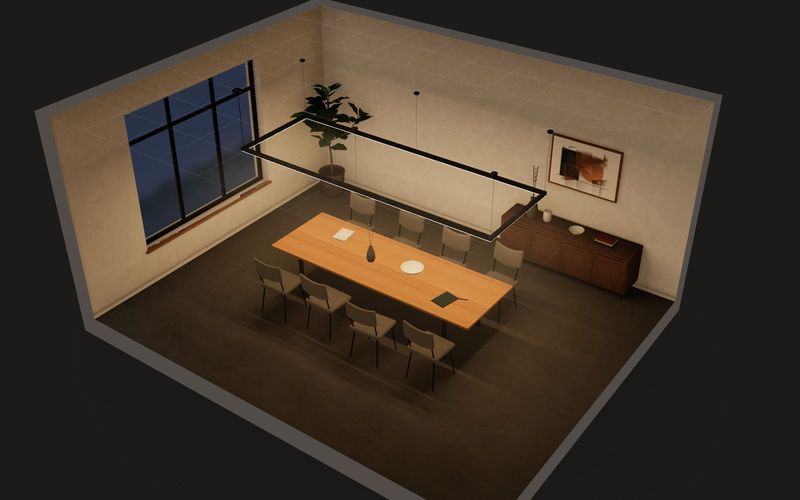
Own demo · fictional product
LUMA LINE linear luminaire
A lighting-system configurator where light itself is the product: draw runs on the ceiling grid, pick optic and colour temperature, and see light cones, lux values, checks and the parts list live.
Read next

Yurt configurator software for yurt and glamping makers
What a 3D yurt configurator needs: diameter, doors and windows placed around the lattice wall, fabrics, stain, options, a site check and an enquiry.

Yard ramp configurator for manufacturers: features, benefits, implementation
What a 3D configurator for mobile yard ramp makers must do: length, bed height, forklift slope, checks, options and an enquiry with a PDF.

Wood-fired hot tub configurator software for hot tub makers
What a 3D configurator should do for wood-fired hot tub makers: stove type, size, cover, lighting, accessories, a running price and an enquiry.