Shelving configurator for manufacturers of modular shelving and storage systems
What a 3D shelving configurator needs for modular shelving makers: bays on your grid, fronts per bay, visible rules, a variant count and a parts list.
Short answer: a 3D shelving configurator pays off for makers of modular shelving when it builds the system the way you manufacture it: bays and levels on your grid, a front per bay, timber and frame finish, free-standing or wall-hung. Your construction rules apply visibly as the buyer plans, and the plan produces a parts list. A configuration made in your shop then becomes an order that production and installers can read without a phone call.
This guide is for managing directors, product and e-commerce leads at makers of shelving and sideboard systems in wood and metal, at joinery workshops with their own system range, and at furniture retailers who sell such systems. Their buyers range from a homeowner in your online shop to an architect planning a full wall of storage for an office or a practice.

Why is a shelving system harder to sell online than a sofa or a table?
Because the product does not exist until the buyer designs it. Four things follow:
- Too many versions to photograph. Width, height and the use of each bay are the buyer's choice. Even a modest grid produces more combinations than any image library could cover.
- Not every combination can be built. A wide door, drawers in a wide bay, a desk flap at the wrong height: your engineering sets limits the buyer cannot see.
- The order is a list of parts. Uprights, shelves, fittings and fronts follow from the plan. Typing that list from a sketch invites mistakes.
- The wall matters. Free-standing or wall-hung changes both the parts and the installation.
Which features are needed, and what does our example show?
| Feature | Why | In the example configurator |
|---|---|---|
| Bays, levels, bay width and depth on your grid | only sizes you make | yes: 1–6 bays, 3–7 levels, 60/80/100 cm, 25/35 cm |
| A front per bay | plan storage | yes: open, door, drawers, writing flap; also by clicking a bay |
| Presets as a starting point | quick start | yes: storage, home office, mixed, all open; styling objects can be shown or hidden |
| Timber, frame colour, mounting | choose the finish | yes: 3 timbers, 3 frame colours, free-standing or wall-hung |
| Construction rules with visible corrections | only buildable orders | yes, as example rules on the model |
| Parts list from the plan | quote, production, installation | yes, without prices |
| Price, basket or enquiry | closing the sale | no, a project feature |
What do makers gain?
We do not promise figures. The gains sit where your sales office already spends time:
- Orders that can be built. If the configurator corrects a combination before it is ordered, nobody has to sort it out afterwards.
- A list instead of a sketch. The parts list names the same parts in the same form on every order.
- A system people understand. A buyer who sees a wide door turn into a pair of doors understands your grid without reading a price list.
- One plan for shop and showroom. Retailers and architects work with the same view as the buyer at home.
Try the example
Our modular shelving configurator is an example configurator with a fictional wood-and-steel shelving system and example values, built by Modelwright; no manufacturer commissioned or reviewed it. It offers 1 to 6 bays and 3 to 7 levels, bay widths of 60, 80 or 100 cm, depths of 25 or 35 cm, an open shelf, door, drawers or writing flap per bay, oak, walnut or white lacquer with a black, white or brass-tone frame, and free-standing or wall-hung mounting. The fronts can be opened.
Three switches make the logic visible. "Show rules" labels every rule that is currently correcting something on the model. "Variant count" shows how many valid versions the grid allows: about 1.7 million. "Parts list" lists the parts live from the model, without prices. With the defaults (three 80 cm bays, five levels, free-standing) two rules apply: the door bay gets two leaves, and wall anchors are added because the example rule allows free-standing units above four levels only with a wall fixing. That rule illustrates how a maker's own requirement is represented; it is not a statement about the stability of any product.
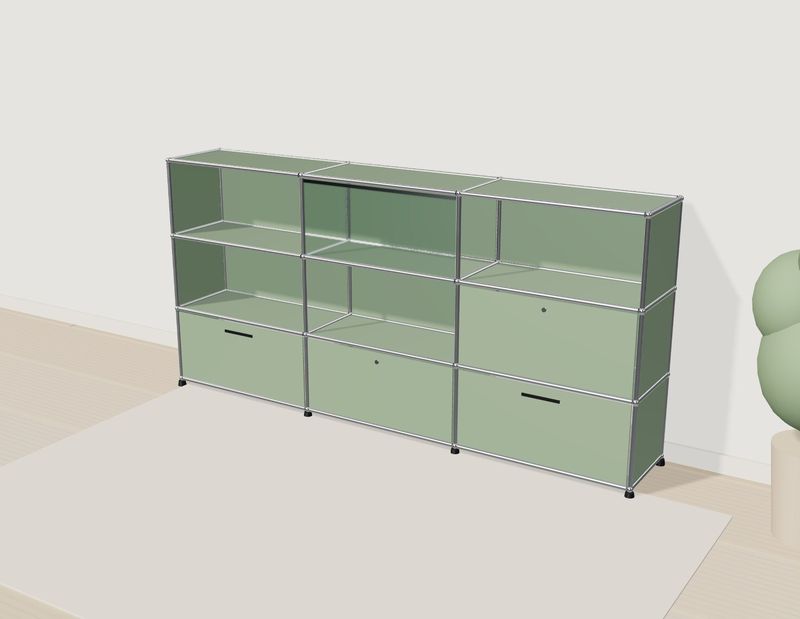
Own demo · fictional product
Shelving configurator
A modular shelf: change the grid, fronts and colours, or click a compartment in 3D. The parts list keeps up.
The rules, the variant count and the parts list are explained one by one in modular shelving rules, variant count and parts list.
Shop, retailer or enquiry?
All three are common for shelving. In your own shop every configuration needs a price that follows from the parts list. With retailers and architects, the plan more often ends in an enquiry or a hand-over to the dealer. What each route needs is covered in furniture configurator enquiries and dealers; what drives the effort in furniture configurator cost.
How would it be built for your system?
For your product we build it with your grid and profiles, your fronts and fittings, your timbers and colours, your construction rules and your part-numbering logic, and the ending you choose: an enquiry by email or webhook or, if you want them, prices calculated from the parts list. Drawings, dimension tables and photos are usually enough; CAD is used when it suits the web. How a project runs is described under custom 3D configurator development.
Frequently asked questions
Can the parts list carry our part numbers?
Yes, in a project. The demo names parts with size and quantity; for your system we map each line to your part number once the logic behind it is described.
Does it show prices?
The demo does not. Prices can be calculated from the parts list if you supply part prices or pricing rules.
Who decides the rules?
You do. They come from your engineering; we implement them as data, so a new rule or a new bay width can be added without rebuilding the logic.
Sources
- Demo features: "Live in this demo" list on the modular shelving configurator library page, read 14 November 2026: modelwright.de/en/library/modular-shelving-configurator/
- Rules, variant count and parts list: demo source code (shelving.source.js: RULES, resolve, variantCount, bom; shelving.js: display), read 14 November 2026.
Read next

Yurt configurator software for yurt and glamping makers
What a 3D yurt configurator needs: diameter, doors and windows placed around the lattice wall, fabrics, stain, options, a site check and an enquiry.

Yard ramp configurator for manufacturers: features, benefits, implementation
What a 3D configurator for mobile yard ramp makers must do: length, bed height, forklift slope, checks, options and an enquiry with a PDF.

Wood-fired hot tub configurator software for hot tub makers
What a 3D configurator should do for wood-fired hot tub makers: stove type, size, cover, lighting, accessories, a running price and an enquiry.