Modular shelving configurator logic: construction rules, variant count and parts list
How a shelving configurator turns input into buildable configurations with visible corrections, counts valid variants and derives a parts list.
Short answer: a shelving configurator rests on three parts. Rules turn what the buyer asks for into something that can be built. A count says how many valid configurations the system has. A parts list derives parts and quantities from the plan. Our example configurator shows all three with example values, and follows one principle throughout: a rule does not silently forbid; it corrects visibly and says why.

What can the buyer change?
- Bays: 1 to 6.
- Levels: 3 to 7, on a 36 cm level pitch.
- Bay width: 60, 80 or 100 cm. Depth: 25 or 35 cm.
- Front per bay: open shelf, door, drawers or writing flap. Clicking a bay in the 3D model steps its front on to the next type; presets such as "home office" or "storage" set all fronts at once.
- Timber and frame: oak, walnut or white lacquer; black, white or brass tone.
- Mounting: free-standing on feet or wall-hung on a rail.
Which rules does the example run?
The demo has seven example rules, each a condition plus a correction. With "Show rules" on, every rule that applies is labelled on the bay it affects (the rule labels and the parts list are in German in the current demo):
| If… | …the model does this |
|---|---|
| a door bay is wider than 60 cm | two door leaves instead of one |
| drawers sit in a 100 cm bay | a centre support front and back, drawers split in two |
| the unit is free-standing with more than 4 levels | a wall anchor on every frame line |
| a writing flap is chosen at 25 cm depth | depth set to 35 cm |
| a writing flap needs a 72–76 cm working height | the bay's shelf moved to 74 cm |
| a writing flap needs knee room | shelves below the flap removed |
| a writing flap needs a compartment of at least 25 cm above | one level added |
Every value belongs to a fictional system. In a real project the conditions and limits come from your engineering, and the configurator only applies them. That includes the wall-anchor rule: it shows how a maker's requirement is represented and makes no statement about stability.
Why correct rather than block? A buyer who picks an 80 cm door wants a closed bay. A pair of doors gives them that and stays buildable; a greyed-out option leaves them guessing. Where no correction is possible, explain the option rather than disable it without a word. There is a bonus for the enquiry, too: because each correction is a named rule, it can be carried into the summary, so your sales office sees both what the buyer chose and what the system made of it.
Where does the variant count come from?
"Variant count" overlays "≈ 1,7 Mio. Varianten aus einem Modell" on the model (the label is in German in the current demo). The figure is calculated, not estimated. For each combination of levels (5 values), bay width (3), depth (2) and mounting (2), the function adds up the possible front assignments for 1 to 6 bays and multiplies by the 9 timber-and-frame combinations. A writing flap counts as a fourth front type only where it fits without correction: at 35 cm depth and a number of levels that reaches the working height. The total is exactly 1,651,104 valid configurations.
The exact number matters less than what it tells your team: a range like this cannot be photographed or kept as a variant list. It can only be described as rules plus a model.
What is in the parts list?
The parts list is generated live from the same resolved configuration that builds the model, and states part, size and quantity, without prices. With the defaults (three 80 cm bays, five levels, 35 cm deep, oak, black frame, free-standing, fronts door / open / drawers) it has 14 lines, among them:
- 8 steel uprights, 15 shelves, 20 concealed support blades with 40 screws;
- 8 adjustable feet and 4 base rails, because the unit stands free; wall-hung, it would get a wall rail and hanging brackets instead;
- 4 wall anchors from the more-than-four-levels rule;
- for the door bay 2 leaves with 4 hinges, for the drawer bay 2 drawers on 2 pairs of full-extension runners, plus carcass inserts, handles and an assembly kit.
So every rule leaves a trace in the list. That makes a good acceptance test for a project: if the list matches your production team's hand count for the defaults and a few edge cases, the logic is right.
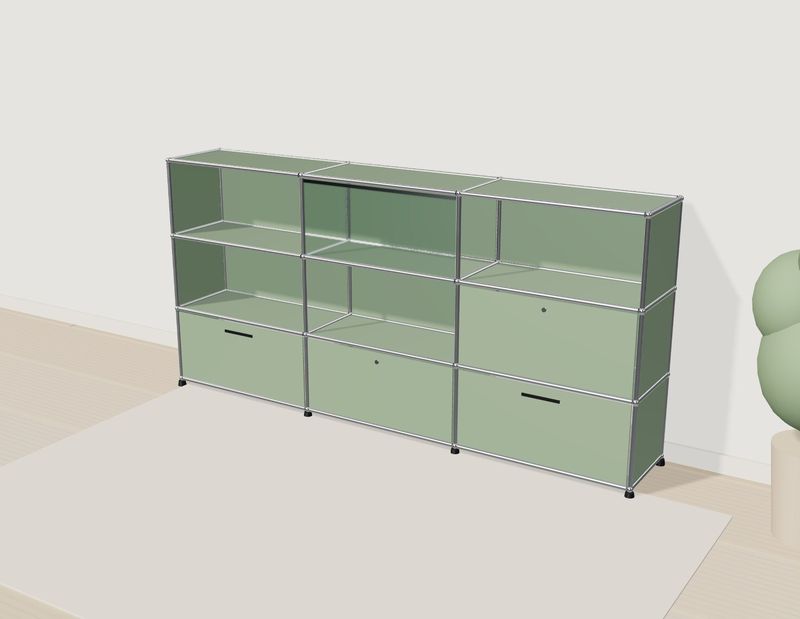
Own demo · fictional product
Shelving configurator
A modular shelf: change the grid, fronts and colours, or click a compartment in 3D. The parts list keeps up.
What would a project add?
The demo stops at the view and the list. For your system we would propose part numbers per line, prices from part prices or pricing rules, a summary with an enquiry by email or webhook and, if needed, a hand-over of the list in a format your shop or order processing can read. Data preparation, materials and load time are covered in furniture configurator implementation; the industry view in shelving configurator for manufacturers; how a project runs in custom 3D configurator development. The demo itself is on the library page.
Frequently asked questions
Does every new rule need a developer?
Not if rules are kept as data with a condition and a correction: limits can then change without rebuilding the logic. Entirely new kinds of rule still need development.
What happens when several rules apply at once?
They are applied in turn and all of them are shown. With the defaults, two apply: the pair of doors and the wall anchors.
How do we check the parts list is right?
With test cases: your production team counts a handful of configurations by hand and we compare. Those cases belong in the specification.
Sources
- Demo features: "Live in this demo" list on the modular shelving configurator library page, read 14 November 2026: modelwright.de/en/library/modular-shelving-configurator/
- Rules, variant count and parts list: demo source code (shelving.source.js: DIM, RULES, resolve, deskIndex, variantCount, bom; shelving.js: labels, bay click), read 14 November 2026; variant count and default parts list recalculated by hand.
Read next

Yurt configurator rules: placing doors and windows on the lattice wall
The rules a yurt configurator needs: wall length per diameter, the space each opening takes, a second door opposite, collision-free dragging, options.

Yard ramp slope, bed height and checks as configurator rules
How a yard ramp configurator calculates slope from length, level-off and bed height, and checks lift range, door opening and forklift clearance.

Wire partition planner rules: outline, doors and parts
The rules a wire partition planner needs: outline on a grid, wall lengths, heights, doors and service windows, ceiling and lock, layout checks and parts.