Alloy wheel configurator for wheel manufacturers and dealers: features, benefits, implementation
What a 3D wheel configurator does for alloy wheel and accessory makers, tyre dealers and workshops: design, finish, size, fitment data and the dealer path.
Short answer: a 3D wheel configurator suits alloy wheel and accessory makers with many designs, finishes and sizes who sell through dealers, tyre centres and workshops. It shows the wheel with tyre and brake as it will look on the car: design, finish, rim size and calliper colour. The harder part is the fitment data. Which wheel fits which vehicle comes from your database, not from the 3D model.
This guide is for managing directors, product managers, marketing and sales leads at alloy wheel and car accessory makers, and at larger tyre and wheel retailers. The rules for rim size, tyre and finish are covered in wheel configurator logic.

What makes wheels different from other products?
- The finish sells. A diamond-cut wheel in gunmetal looks nothing like the same design in silver. Photographing every design in every finish and size is expensive; in a 3D model every combination is visible.
- A wheel only works in context. Tyre sidewall, brake disc and calliper are part of the picture. Someone choosing 19 instead of 18 inches wants to see how low the sidewall gets.
- Liking a wheel is not the same as being allowed to fit it. Whether a wheel may go on a given vehicle depends on dimensions, load rating and approvals, and the rules differ by market. In Germany, for example, § 22 StVZO governs the operating permit for vehicle parts [1]. Which approvals apply to your wheels and for which vehicles is your responsibility as the manufacturer. A configurator can display that data; it cannot replace it.
Who uses a wheel configurator?
| User | What they need | What the configurator provides |
|---|---|---|
| Driver on your website | Compare designs and finishes, judge the size | The wheel in 3D with tyre and brake, every combination rotatable |
| Tyre dealer, workshop | One consistent picture for advice, the right part numbers | The same presentation in every branch; in a project, the link to vehicle and part number |
| Your sales and marketing | Show new designs before photos exist | Product images per variant from the same model |
Which features belong in a wheel configurator?
Our example configurator for an alloy wheel shows the following. The design is our own geometry, with no manufacturer shapes or logos; the product is fictional and all values are example values.
- Design: 5-spoke, twin-spoke or turbine.
- Finish: silver, gunmetal, gloss black or matte bronze, plus an optional diamond-cut face on which the pockets and flanks stay painted.
- Size: 18, 19 or 20 inches at the same outer diameter of about 679 mm. Sidewall, rim and brake disc adapt.
- Brake calliper: four colours; when you pick one, a stationary wheel turns so a spoke window lines up with the calliper.
- Spin: the wheel turns in front of the fixed calliper.
- Notes on the model: same outer diameter, six-piston calliper, diamond-cut face.
Example configurator · fictional product: Alloy wheel. Switch design, finish and size, recolour the calliper and set the wheel spinning.
What the demo does not include: vehicle selection, bolt pattern, offset, load rating, approval documents, prices and an enquiry. Those are data and processes that come from your systems and are connected in the project.
Where does the fitment data come from?
With wheels, the data decides how useful the configurator is. There are three typical routes:
- No vehicle link: the configurator shows designs and finishes; the dealer sorts out fitment. Simple, but buyers do not know what fits their car.
- With your fitment list: buyers choose their vehicle, and the configurator shows only matching sizes and points to the documents. You maintain the list; the configurator reads it.
- With the dealer system: the selection goes with vehicle and part number to a dealer or your dealer portal. Whether and how that is connected is checked case by case.
How configurations are passed on to dealers is covered in personalised products: from configurator to order.
What does a wheel configurator bring?
We do not promise figures. In concrete terms:
- Less photography: new designs and finishes are visible as soon as the model and materials are ready.
- Better advice in the trade: dealers show the effect of a size change on the model rather than in a catalogue.
- One consistent picture: website, dealers and shop show the same wheel at the same quality.
Whether a 3D model or a 360° photo set suits you better depends on the number of variants; see 3D product viewer for the viewer side.
How does a project run?
- Scope: designs, finishes, sizes, tyres, and whether vehicle data is included.
- Data: CAD data of the wheels, or drawings and photos; finish samples; fitment lists. See CAD to a web 3D configurator.
- Model and rules: wheel face, rim barrel, tyre per size, materials, rules from your data.
- Review: you test via a private link.
- Go live: as its own page or in your website, shop or dealer portal; enquiries by email or webhook.
How we build configurators in general is described in custom 3D configurator development, and what drives the cost in what a 3D configurator costs.
Common questions
Can the wheel be shown on a car?
Technically yes, with a vehicle model. That needs its own models and rights and is a separate scope. The demo shows the wheel on its own.
Do we have to hand over our design data?
For the presentation, a simplified model of the visible surfaces is usually enough. Internal engineering detail does not need to go on the web.
Sources
- German Road Vehicles Registration and Licensing Regulation (StVZO), § 22 "Betriebserlaubnis für Fahrzeugteile" (operating permit for vehicle parts), read 14 November 2026: gesetze-im-internet.de
- Demo features: the "Live in this demo" list on the alloy wheel library page and the demo source /assets/mw3d/demos/wheel.js (read 14 November 2026)
Examples to try
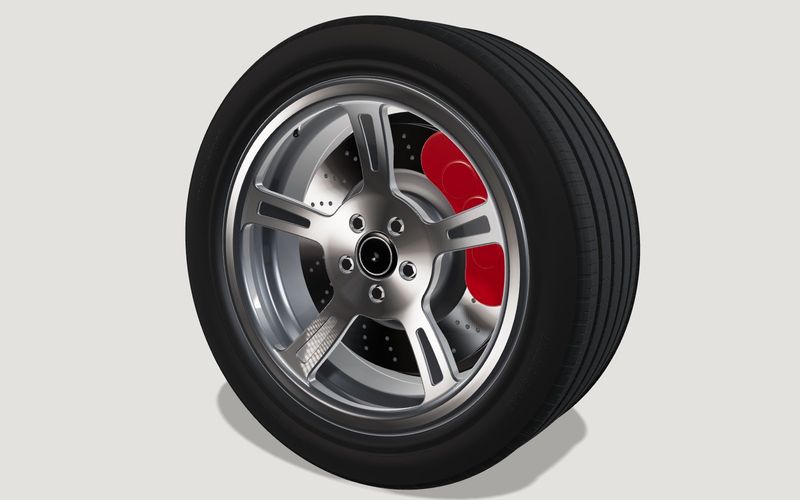
Own demo · fictional product
Alloy wheel
Rim, tyre and brake: switch the design, finish and size, and the tyre adapts.
Read next

Yurt configurator software for yurt and glamping makers
What a 3D yurt configurator needs: diameter, doors and windows placed around the lattice wall, fabrics, stain, options, a site check and an enquiry.

Yard ramp configurator for manufacturers: features, benefits, implementation
What a 3D configurator for mobile yard ramp makers must do: length, bed height, forklift slope, checks, options and an enquiry with a PDF.

Wood-fired hot tub configurator software for hot tub makers
What a 3D configurator should do for wood-fired hot tub makers: stove type, size, cover, lighting, accessories, a running price and an enquiry.