Automation cell configurator for machine builders: features, benefits, implementation
What a 3D configurator for modular production and automation cells needs: modules, rules, line height, hall layout, parts list and a complete enquiry.
Short answer: a 3D configurator is worth building for makers of modular production and automation cells when it captures the logic of the cell: which process modules fit which slots, which guarding a module requires, how the cell meets the buyer's existing line and which key figures follow. The result is an enquiry with a parts list and key figures that your sales and application engineers can discuss, instead of a free-text email.

Who is this for?
This guide is for managing directors, sales managers and product managers at special-purpose machine builders, automation suppliers and system integrators who offer production cells built from recurring blocks: base frame, process stations, robot, guarding enclosure and transfer. On the buyer's side, in our assessment, there are usually several people at once: production planning, maintenance, purchasing and often someone responsible for health and safety. Each of them looks at something different.
What makes a production cell different in a configurator?
- Modules depend on each other. A single module says little. Only the combination of station, handling and guarding makes a cell your company would actually offer.
- The cell connects to something. If it sits at a conveyor or in a line, the working height is given.
- Floor space is limited. Service areas, doors and aisles decide whether a variant is an option at all.
- The buyer thinks in key figures. Cycle time, connected load and footprint can go into a capital request before a quote is negotiated.
A brochure with three standard cells cannot show this, and a data sheet with an option list does not explain why a combination is impossible. A model in which the buyer swaps a module and sees what changes can.
How are cells sold today, and where does 3D help?
Production cells are sold as projects. There is an enquiry, often the buyer's requirements specification, several rounds of discussion and a quote with a layout. A configurator does not replace that. It starts earlier: prospects put together a plausible base configuration themselves before the first meeting, and your sales engineers get a model at trade fairs and on site in which variants are shown rather than described.
For you as the maker, the key point is the quality of the first contact. If the enquiry arrives with chosen modules, line height and position in the hall, your application engineers can judge at once whether the cell comes from the modular range or needs special engineering.
Which capabilities matter?
| Capability | Why | In our example configurator |
|---|---|---|
| Modules in slots | Shows a modular range instead of one-off builds | Yes: laser, screwing and inspection modules in three slots |
| Rules between modules and guarding | Only offer combinations you would supply | Yes, as simplified example rules |
| Connection to the line | Uses the buyer's working height | Yes: line height 800–1000 mm, otherwise a warning |
| Placement in the hall | Clarifies space, service access and doors | Yes, with a collision check |
| Running process | Explains how the cell works | Yes: transfer, laser, screwdriver, camera, robot |
| Cut-away and service view | Brings maintenance in early | Yes, with wear parts and intervals |
| Parts list and key figures | Basis for the quote and the capital request | Yes: item numbers, example price, cycle time, power, footprint |
| Enquiry to your sales team by email or webhook | A complete first contact | No, built in a project |
Everything in the right-hand column comes from the "Live in this demo" list on the library page [1].
What does a cell builder gain?
We do not promise figures. The gains are in discussions that happen several times today:
- Fewer questions about the base configuration. Stations, working height and guarding are in the enquiry.
- Impossible combinations show up early. A rule your sales engineers carry in their heads becomes visible to every prospect.
- Everyone looks at the same model. Production planning, maintenance and purchasing see one cell, not three documents.
- Key figures to pass on. Cycle time, power and footprint help the buyer internally, if you decide to show them.
Where are the limits?
A configurator is not proof of safety. Rules such as "robot only with fence and light curtain" reflect what your company offers; they do not replace a risk assessment or safety acceptance. Responsibility for the safety and conformity of a cell lies with the manufacturer or integrator, not with the configurator. Cycle times from a configurator are guide values that your engineers must confirm.
Try the example
Our modular automation cell is an example configurator with a fictional product and example values, built by Modelwright. Rules, clearance and collision checks are simplified and the prices are examples; the library page says explicitly that it is not a safety assessment, not a risk assessment and not a quote [1]. Live in the demo: laser, screwing and inspection modules in three slots; the rules "robot only with fence and light curtain" and "laser and vision only in the cabin"; a line height of 800 to 1000 mm that frame and feet adapt to; placement in a hall with service and door-swing areas; the running process; a cut-away and service view; and a parts list with item numbers, example price, cycle time, power and footprint.
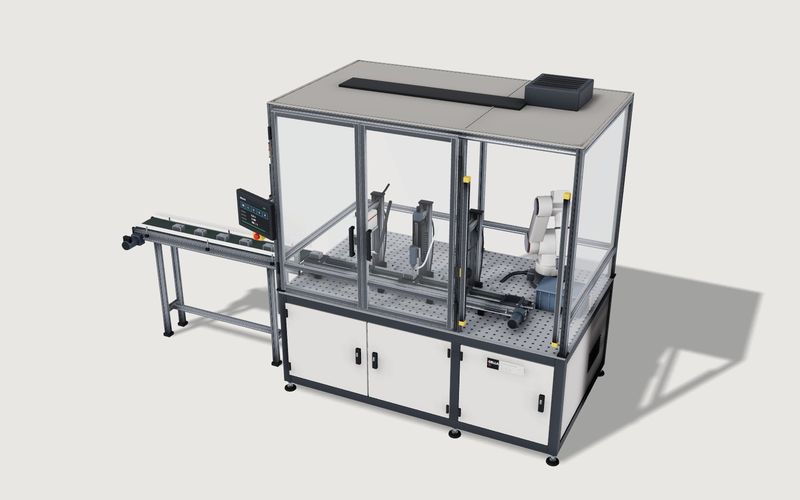
Own demo · fictional product
Modular automation cell
A fictional production cell with modules, robot and guarding: rules, placement in the hall, a running process and a parts list with example prices.
How the rules and the parts list are structured is explained in automation cell configurator rules, line height and parts list.
How would it be built for your cells?
For your product we build the configurator with your modules and slots, your combination rules, your working heights and frame variants, your item numbers and, if you want them, your prices and key figures. CAD data is used when it suits the web; usually a simplified model without manufacturing detail is derived from the design, as described in CAD to web 3D configurator. Who should receive the enquiry, and what it should contain for machinery and loading equipment, is covered in enquiries from machinery and loading equipment configurators. The project process is on 3D configurator development, the cost factors in what a 3D configurator costs.
Frequently asked questions
Does the configurator replace application engineering?
No. It delivers a base configuration with modules, working height and key figures. Layout, cycle time and the safety concept are still checked by your engineers.
Can we cover special solutions?
The configurator shows the modular range. For anything beyond it, a notes field in the enquiry works better than a rule for every special case.
Are the rules in the demo safety rules?
No. They are simplified example rules for a fictional product. The guarding a real cell needs is decided by the manufacturer.
Sources
- Modelwright library: modular automation cell, "Live in this demo" list and example-value note, read 14 November 2026: modelwright.de/en/library/automation-cell-configurator/
Examples to try
Own demo · fictional product
Modular automation cell
A fictional production cell with modules, robot and guarding: rules, placement in the hall, a running process and a parts list with example prices.
Read next

Yurt configurator software for yurt and glamping makers
What a 3D yurt configurator needs: diameter, doors and windows placed around the lattice wall, fabrics, stain, options, a site check and an enquiry.

Yard ramp configurator for manufacturers: features, benefits, implementation
What a 3D configurator for mobile yard ramp makers must do: length, bed height, forklift slope, checks, options and an enquiry with a PDF.

Wood-fired hot tub configurator software for hot tub makers
What a 3D configurator should do for wood-fired hot tub makers: stove type, size, cover, lighting, accessories, a running price and an enquiry.