Automation cell configurator rules: modules, line height, cycle time and parts list
The rules an automation cell configurator needs: modules and guarding, matching the buyer's line height, cycle time, key figures and a parts list.
Short answer: an automation cell configurator needs four sets of rules. Combination: which modules, handling and guarding belong together? Connection: which frame matches the buyer's line height? Key figures: what cycle time, power and footprint does the combination give? Parts list: which items follow? Our example configurator runs all four with example values for a fictional product.

Which parameters does a modular cell have?
In the example configurator a few inputs trigger a lot:
| Parameter | Values in the example | What depends on it |
|---|---|---|
| Modules | Laser, screwing and inspection modules in three slots | Guarding, cycle time, power, parts list |
| Handling | With or without robot | Guarding, output station, cycle time |
| Guarding | Table guard (open), fence or cabin | Which modules and handling are allowed |
| Line height | 800 to 1000 mm | Frame variant, levelling feet, warning |
| Position in the hall | Movable | Service and door-swing areas, collisions |
All values are example values for a fictional product. The live features are listed on the library page [1]; the details of consequences and parts list we read in the demo's code.
How are combination rules written?
Every rule has three parts: a condition, a consequence and a message that tells the user why. In the example these include:
- Robot → safety fence with light curtain, or cabin; an open cell cannot be chosen with a robot.
- Laser module or inspection module → closed cabin.
- Material tower as output → robot only.
- At least one module stays selected; empty slots get a blank cover in the parts list.
There are two strategies for the consequence. Block: the invalid option is greyed out and states the reason. Pull along: when the user picks something that requires another choice, the configurator changes that choice too and says so. The demo uses both: blocked options show their reason, and switching on the laser module brings the cabin with it, with a message explaining why. Which strategy suits your range depends on which option your buyers usually start from. Blocking is stricter; pulling along gets to a valid cell faster.
These rules reflect what a maker offers. They are not safety rules and do not replace a risk assessment, as the library page states [1]. Which guarding a real cell needs is decided by the manufacturer; the configurator only implements their rules.
How does the cell match the buyer's line height?
A cell that connects to an existing conveyor must meet its height. In the example the configurator chooses the closest of three frame variants at 850, 900 and 950 mm and covers the rest with levelling feet of ± 25 mm. The standard frame therefore covers line heights from 825 to 975 mm. Outside that range the process keeps running, but the configurator warns and puts a special frame "on request" into the parts list.
The pattern works for many connection dimensions: a small number of standard variants, an adjustment range and a clear limit where engineering takes over. For your sales team the limit is what matters. An enquiry with a special frame is a different enquiry from one with a standard frame.
Where do cycle time, power and footprint come from?
In our assessment, cell buyers ask for three figures early. In the example they are recalculated with every change:
- Cycle time: set by the slowest station plus a fixed transfer time. Adding a slow module raises it; adding a faster one may not. Output in parts per hour follows.
- Connected load: a base load plus a share for each module, the robot, the cabin and the output station.
- Footprint: base frame, infeed conveyor and, if chosen, the material tower.
All three are example values in the demo. In a real project they come from your own design data, and you decide whether the configurator shows them or only writes them into the enquiry. A cycle time in a configurator remains a guide value that your engineers confirm.
How does a configuration become a parts list?
Each choice creates lines with item number, quantity and example price: base frame at the right height, levelling feet with their set adjustment, the chosen modules, robot with gripper, guarding, infeed conveyor and output station. A variant code sums up the combination in one line, and the parts list can be copied as text in the demo.
For a maker this step can save a lot of back-and-forth, provided the data is right. Every rule must have a parts-list consequence: no module without its items, no cabin without its accessories. Before we build, we write this mapping down as a table and check it with your sales team.
What does the service view add?
The demo has a cut-away and service view with wear parts and intervals, for example gripper jaws or screwdriver bits, and shows only the parts of the selected modules. For sales it is an argument towards the buyer's maintenance team; for your service department the same data could later prepare spare-part enquiries. Ordering spare parts is not built into the demo.
What data you supply
We need the documents your application engineers work with today: the module list with prerequisites, frame variants with heights and adjustment ranges, your guarding rules, station times and power ratings if key figures are to be shown, and your item numbers. Where a rule is not written down, we write it with you as condition, consequence and message. How configurators are used in machinery and other industries is covered in our guide to 3D configurators for manufacturers.
Try it
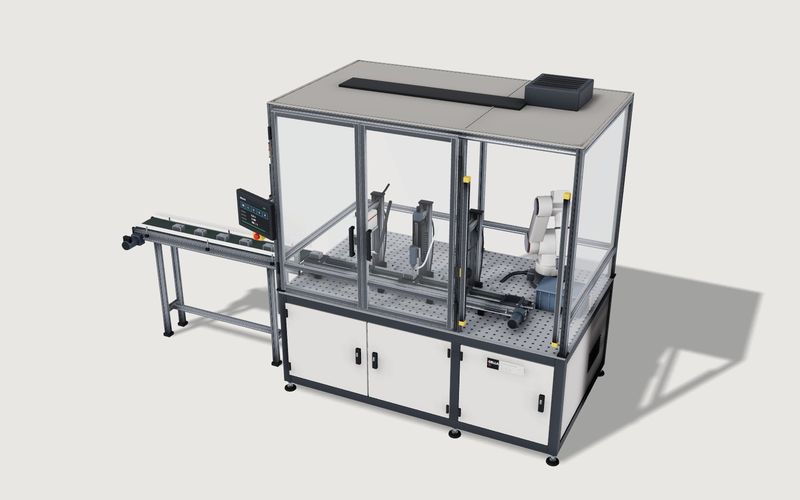
Own demo · fictional product
Modular automation cell
A fictional production cell with modules, robot and guarding: rules, placement in the hall, a running process and a parts list with example prices.
Test the rules in the modular automation cell, an example configurator with a fictional product and example values. Who benefits from such a configurator is covered in automation cell configurator for machine builders; the project is described on 3D configurator development.
Frequently asked questions
Can the configurator show prices?
The demo shows example prices per line. Whether your configurator shows prices, calculates them internally only or names none at all is your decision.
Where does the cycle time come from?
In the demo, from example station times. In a project, from your station times; it stays a guide value until the design is done.
Can rules be changed later?
Yes. We keep rules and parts-list mapping as tables that you agree with us. Small changes are part of hosting and care; larger rework is a separate job.
Sources
- Modelwright library: modular automation cell, "Live in this demo" list and example-value note, read 14 November 2026: modelwright.de/en/library/automation-cell-configurator/
Examples to try
Own demo · fictional product
Modular automation cell
A fictional production cell with modules, robot and guarding: rules, placement in the hall, a running process and a parts list with example prices.
Read next

Yurt configurator rules: placing doors and windows on the lattice wall
The rules a yurt configurator needs: wall length per diameter, the space each opening takes, a second door opposite, collision-free dragging, options.

Yard ramp slope, bed height and checks as configurator rules
How a yard ramp configurator calculates slope from length, level-off and bed height, and checks lift range, door opening and forklift clearance.

Wire partition planner rules: outline, doors and parts
The rules a wire partition planner needs: outline on a grid, wall lengths, heights, doors and service windows, ceiling and lock, layout checks and parts.