Folding carton in 3D: dieline, creases, board caliper and finishing as rules
The data and rules a folding carton configurator needs: states, folding order, board caliper, kraft or white board, foil or spot UV, with a working demo.
Short answer: a folding carton configurator needs three kinds of rules: geometry (which panel folds where on which crease, and how board caliper shifts the dimensions), states (dieline, folded, open, and the order in which changes run) and print (how ink colour, board, finish and embellishment interact). Our example configurator shows all three with example values.

Which parameters does a folding carton have in a configurator?
The table lists the parameters of our example configurator for a reverse tuck end carton. The product is fictional and every value is an example value.
| Parameter | Values in the demo | What changes on the model |
|---|---|---|
| State | Dieline, folded, open | The blank folds or the lid opens |
| Print colour | Terracotta, ink, olive, butter | Colour of the artwork on every panel |
| Board | White, kraft | Board colour, reverse side, cut edge, how the ink looks |
| Finish | Matte, soft-touch, gloss | Sheen and reflections of the printed surface |
| Logo embellishment | Gold foil, spot UV | Logo metallic or as a glossy varnish patch |
| Product name | Free text, up to 14 characters | Text on the front panel |
| Contents | Biscuit rolls on or off | Three rolls inside the carton |
Dimensions are fixed in the demo: the code works with a carton of 14.2 × 5.2 × 18.5 cm and a board caliper of 0.5 mm. For your product, sizes can be stored as fixed variants or driven by dimensions.
How does the dieline become a carton?
The demo's blank consists of glue flap, side A, front, side B and back, plus top and bottom tuck flaps, dust flaps and tuck flaps with slit locks. Every panel is a die-cut outline with a print side, an inner side and a visible cut edge. Three rules make the folding believable:
- The crease bends; it does not hinge. The board bends around the crease line and the length of its mid-surface is preserved. Laid flat, the crease groove shows on the print side.
- Board caliper is taken into account. Side A is one caliper narrower because the glue flap sits inside it. Lids and flaps are shortened accordingly so that nothing passes through anything else when the carton closes.
- The glue flap stays unprinted. It is glued inside the back panel; the demo shows it without artwork.
In the dieline state the demo overlays the cutter guide: cut lines in red, crease lines dashed in blue. As soon as folding starts, the overlay fades out. Viewers first see the flat cutter guide, and then the carton that is folded from it.
In which order do the states change?
States look simple but have an order that has to be decided. In the demo:
- From folded to open, only the lid opens.
- From open to dieline, the carton closes first and then unfolds. An open carton is never laid flat directly.
- Switching the contents on while the carton is closed opens it, so the biscuit rolls become visible.
- During folding the camera moves to an overview and then to the view of the target state, unless the viewer has moved the camera in the meantime.
If the device has "reduce motion" switched on, the demo jumps to the target state without animation [1].
How do print, board and finishing interact?
This is where a packaging model differs from a colour picker. In the demo the inks are multiplied onto the board. On kraft they therefore darken, and unprinted areas show the brown of the board. White areas in the layout, such as a badge, are printed as opaque white and stay light on kraft too. The gold foil sits on top of the print.
The finish controls how the surface returns light: matte scatters, soft-touch looks velvety, gloss shows a clear coat. When the viewer changes the finish or embellishment, the camera moves to the logo so the difference is visible; a new product name brings the camera to the name.
For your project the key question is which combinations you offer. If some embellishments are not available on kraft, or a finish cannot be combined with foil, those exclusions belong in the configurator as rules. The demo has no exclusions; every option combines freely. Keep such exclusions as a table of data your team can review, not hidden in code.
What data does a folding carton configurator need from you?
- Cutter guide with cut and crease lines as a vector file, marking the print side.
- Board caliper and grades, with photos of the top side, reverse and cut edge.
- Artwork or sample layouts on the dieline, separated into inks, white, foil and varnish.
- A list of allowed combinations of board, finish and embellishment.
- Photos of samples for matching material and sheen.
How this data is prepared and where browser rendering reaches its limits is covered in implementing packaging in 3D.
What belongs in the summary?
The demo has no enquiry form. In a project the summary would record the selection: style and size, board, ink colour or layout version, finish, embellishment and product name. Your sales team can copy those details straight into a sample request. The manufacturer's view of the topic is in folding carton 3D configurator for packaging manufacturers.
Example configurator · fictional product: Folding box – switch states, compare board and finishing, open the info points on the model.
Frequently asked questions
Does the demo really fold the blank, or is it an animation between two models?
It folds a single blank along its creases. Each panel hangs off the previous one, and the bend around the crease is calculated.
Can the brand upload its own layouts?
Not in the demo. Whether an upload makes sense in your project is settled in the scope; format and print areas should then be checked before the layout is placed on the carton.
How we build configurators in general: custom 3D configurator development.
Sources
- MDN Web Docs: prefers-reduced-motion, read 14 November 2026: developer.mozilla.org
- Demo features and values: the Folding box library page and the demo source code (box.js: states, dimensions, caliper, print build-up, info points), read 14 November 2026
Examples to try
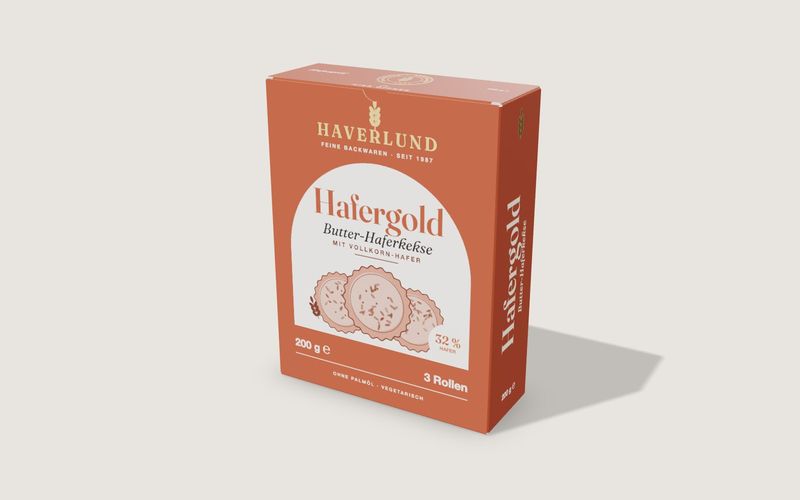
Own demo · fictional product
Folding box
A tuck-end carton from flat dieline to open box, with real board thickness, creases, print and finishing.
Read next

Yurt configurator rules: placing doors and windows on the lattice wall
The rules a yurt configurator needs: wall length per diameter, the space each opening takes, a second door opposite, collision-free dragging, options.

Yard ramp slope, bed height and checks as configurator rules
How a yard ramp configurator calculates slope from length, level-off and bed height, and checks lift range, door opening and forklift clearance.

Wire partition planner rules: outline, doors and parts
The rules a wire partition planner needs: outline on a grid, wall lengths, heights, doors and service windows, ceiling and lock, layout checks and parts.