Gearbox exploded view: assembly order, part notes and a drive with the true ratio
How an interactive exploded view of a spur gearbox is built: views, assembly order, notes on parts and a drive that keeps the real gear ratio.
Short answer: an interactive exploded view of a gearbox is built from four parts: views (closed, see-through cover, exploded), an assembly order in which parts move apart and back together, notes on individual parts and a drive that makes the ratio visible. Each one is a decision you take in advance, not an effect. Our example with a fictional spur gear reducer shows all four.

Which views does a gearbox need?
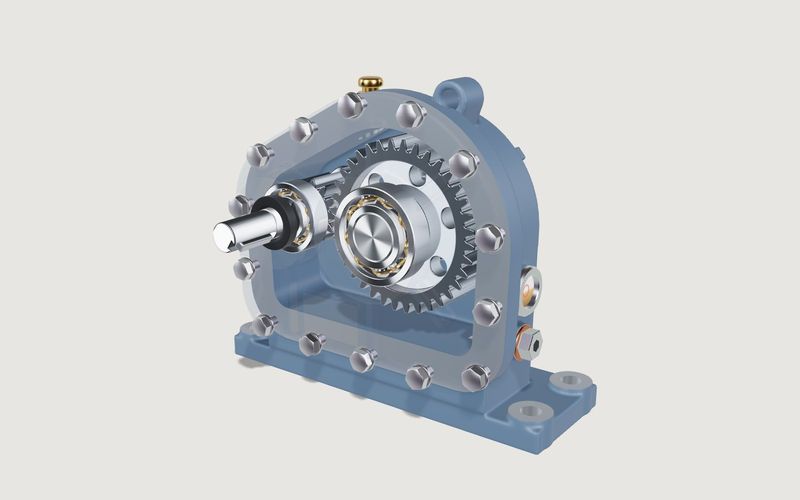
The example has three states the user switches between [1]:
- Closed: the gearbox as it looks installed, for the product page and a first impression.
- See-through cover: gearing and bearings visible in context, with nothing missing. This view shows the function.
- Exploded: parts move apart in assembly order. This view shows the build.
A cut-away view is another option; our planetary gearhead example uses one. Which view comes first depends on purpose: closed on a product page, see-through in training.
How is an assembly order defined?
An explosion in which every part flies outwards at once looks impressive and explains little. An explosion in assembly order explains the build. In the example the order follows how the unit would be taken apart: bolts, cover, seals, circlip, bearings, then the shaft sub-assemblies along their axes. Parts start slightly staggered, and closing runs everything in reverse.
For a model of your gearbox we write the order down as a list before animating it:
| Decision | Question for your team |
|---|---|
| Groups | Which parts move together, such as a shaft with its gear, bearings and key? |
| Order | In which sequence does your service team dismantle the unit? |
| Direction and travel | Along which axis does a part come out, and how far should it move so nothing stays hidden? |
| Way back | Does closing run exactly in reverse, or must some parts go back first? |
The answers are often in assembly or service documents; if they are missing, a talk with a fitter can supply them. The same list is the starting point for a step-by-step assembly guide.
How are notes on parts built?
The example has five notes on parts [1], for instance on the pinion shaft, the output gear, a bearing, the shaft seal and the breather with oil sight glass. Each note has the same elements:
- an anchor point on the part that moves with every view;
- a title and a short text saying what the part is for;
- a visibility rule: notes on internal parts appear only when those parts can be seen;
- a camera position the model moves to when the note is tapped.
The texts take the most work because they must be technically right. In a project your technical writers write or approve them. More than a handful of notes per view clutters the model; a selection per audience works better. For several languages, keep the note texts separate from the model from the start, so a translation can be checked without touching the model.
How does the model show the ratio?
The example has involute gearing with 12 and 36 teeth, i.e. a 3 : 1 ratio [1]. The user switches the drive on and sets the input speed; next to it the output speed is shown, a third of the input in this example. So that the motion can be followed, it runs in 1 : 30 slow motion. The slow motion slows both shafts equally, so the ratio stays exact.
This coupling is the core of a gearbox explainer: the animation is not drawn by hand but calculated from tooth counts and speed. In multi-stage gearboxes each stage is coupled the same way; the demo is single-stage, so that is not shown. For training the combination is useful: in the example the drive also runs with the see-through cover, so a fitter sees which bearings turn with which shaft.
What would a gearbox configurator add?
The demo is an explainer, not a selection configurator. For a configurator in which buyers select a gearbox, these blocks would typically be added. They are not in the demo and are described here as a proposal:
- Selection parameters: frame size, ratio from your list, mounting position, shaft and flange design, motor adapter where relevant.
- Rules: which ratios exist per frame size and which mounting positions combine with which shafts.
- Geometry per variant: housings and shafts that change with the choice, assembled from a limited set of blocks rather than one model per type.
- Result: a type code in your notation and an enquiry to your sales team.
The technical design, i.e. whether a gearbox suits an application, stays with you. A configurator can implement your selection rules; it does not replace a calculation.
What data you supply
For an explainer: CAD data or drawings of the series, the dismantling order from assembly or service, part names, note texts and the figures that may be shown. A simplified web model is derived from CAD data; the process is described in CAD to web 3D configurator.
Try it
Own demo · fictional product
Spur gear reducer
A textbook gearbox for sales and training: see-through cover, exploded view, running drive with ratio.
The spur gear reducer is an example configurator with a fictional product and example values. What gearbox makers use such a model for is covered in spur gearbox in 3D for sales and training; the project is described on 3D configurator development.
Frequently asked questions
How is this different from an exploded drawing?
An exploded drawing shows one fixed state. The interactive exploded view shows the way there in assembly order, can be rotated and closed again.
Is the speed in the model right?
The ratio is: the output speed follows from the tooth counts. The motion runs in slow motion so it can be seen.
Can we show several frame sizes?
Yes, in a project. Shared parts are built once and the differences per size are stored.
Sources
- Modelwright library: spur gear reducer, "Live in this demo" list and example-value note, read 14 November 2026: modelwright.de/en/library/gearbox-exploded-view/
Examples to try
Own demo · fictional product
Spur gear reducer
A textbook gearbox for sales and training: see-through cover, exploded view, running drive with ratio.
Read next

Yurt configurator rules: placing doors and windows on the lattice wall
The rules a yurt configurator needs: wall length per diameter, the space each opening takes, a second door opposite, collision-free dragging, options.

Yard ramp slope, bed height and checks as configurator rules
How a yard ramp configurator calculates slope from length, level-off and bed height, and checks lift range, door opening and forklift clearance.

Wire partition planner rules: outline, doors and parts
The rules a wire partition planner needs: outline on a grid, wall lengths, heights, doors and service windows, ceiling and lock, layout checks and parts.