Jewellery configurator for jewellers and jewellery brands: features, benefits, implementation
What a 3D jewellery configurator does for jewellers, goldsmiths and jewellery brands: metal, stone, size and engraving, in the shop and online.
Short answer: a 3D jewellery configurator is worth it for jewellers, goldsmiths and jewellery brands whose pieces are made after the order: engagement rings, wedding bands, engraved pendants. It shows the buyer exactly the combination of metal, stone, size and engraving they are about to order, on a tablet at the counter or in the online shop. For you, the real value is what comes out at the end: a complete, unambiguous job description for the workshop.
This guide is for owners, sales and e-commerce leads at jewellers, goldsmiths and jewellery brands. It covers what a jewellery configurator should do, where the picture stops being evidence and how a project runs. The rules in detail (ring size, carat, setting and engraving) are covered in ring configurator logic.

Why is jewellery different from other configurable products?
With a ring, material matters more than shape. Buyers want to see rose gold next to white gold, a sapphire next to a diamond, brushed next to polished. That creates three particular demands:
- Small object, high demands on light and material. A ring is about two centimetres across. The shine of the band, the light in the stone and the edge of a prong decide whether the picture is believable.
- Personalisation is part of the product. An engraving inside the band is not an accessory; it turns the piece into a one-off. Buyers want to see it before anything is made.
- Size is a measurement, not a variant. Ring sizes are expressed differently from country to country. A configurator has to make the size unambiguous, or you get questions and resizing work.
Who uses a jewellery configurator, and where?
| Situation | What is needed | What the configurator contributes |
|---|---|---|
| Consultation in the shop | Show variants that are not in the display case | Switch metal, stone and carat on a tablet; agree the engraving together |
| A brand's online shop | Buy or enquire without an appointment | Show the chosen combination and pass it on as order data |
| Goldsmith's workshop | An unambiguous job | Metal, finish, stone, carat, setting, size and engraving text in one summary |
Which features belong in a jewellery configurator?
Our example configurator for a solitaire ring shows the following. The product is fictional and all values are example values; no manufacturer commissioned or reviewed the demo.
- Metal: 18k yellow, rose and white gold and platinum 950, as swatches.
- Finish: polished or brushed; brushed shows fine lines running round the band.
- Stone: diamond, sapphire, ruby or emerald, each as a 57-facet round brilliant.
- Carat and setting: 0.25, 0.5 or 1 ct; four or six prongs. The head is rebuilt to fit each stone size.
- Ring size: 48 to 64 on a slider, with the inner diameter shown.
- Engraving: your own text, up to 16 characters, cut live into the inside of the band; the view moves in to show it.
- Notes on the model: three hotspots explain the prong setting, the round brilliant and the engraving.
Example configurator · fictional product: Solitaire ring. Choose metal, stone, carat, setting and size, and watch your engraving appear inside the band.
What the demo deliberately leaves out: price, summary, enquiry and basket. It shows the presentation and the variants. Price rules, enquiries by email or webhook and embedding in your shop are set up per project.
What does a jeweller gain?
We do not promise figures. The benefit sits at points in the process you can judge yourself:
- Range without stock: not every combination of metal, stone and carat sits in the display case, but every one is visible in the model.
- Engraving agreed before production: spelling, characters and length are settled before the workshop starts.
- Clear jobs: one summary with every attribute replaces handwritten notes from the consultation.
- Images from the same model: product images per variant can be rendered from the 3D model, including variants that were never photographed.
Whether it pays depends on how much of your range is made to order and how much time goes into back-and-forth and corrections today. Your sales staff and your workshop know that best.
Where are the limits?
A screen does not show a real stone. Our demo traces light through the stone live (refraction, reflection and dispersion) so brilliance and fire look believable. It remains a picture: the colour and clarity of a particular stone, alloy details, fineness and hallmarks are documented by you as the jeweller, not by the configurator. Screens also differ in colour and brightness, so a note that colours may differ from the piece is sensible.
How does a project run?
- Scope: one model or collection, with its metals, stones, carats, settings, sizes and engraving rules.
- Data: CAD files from your jewellery design software if you have them; otherwise drawings, measurements and photos. We check before starting whether they are enough; see CAD to a web 3D configurator.
- Model and rules: geometry, materials, and rules such as engraving length or available carats per model.
- Review: you test via a private link, on the shop tablet and on your phone.
- Go live: as its own page or embedded in your website or shop; enquiries by email or webhook to your sales team.
How a personalised configuration turns into an order or a dealer enquiry is covered in personalised products: from configurator to order. What drives the cost is explained in what a 3D configurator costs, and how we build configurators in general in custom 3D configurator development.
Common questions
Can you use our jewellery CAD files?
Often, yes. Whether a file can be used directly or needs rework depends on its format and structure. We check that before quoting.
Is this only for rings?
No. The same approach fits pendants, earrings or bracelets with variants in metal, stone and engraving. The rules change, for example chain lengths instead of ring sizes.
Can the configurator show a price?
Yes, if you define price rules, for example per metal, stone and carat. The ring demo deliberately shows none.
Sources
- Demo features: the "Live in this demo" list on the solitaire ring library page and the demo source /assets/mw3d/demos/ring.js (read 14 November 2026)
- Scope of services: "Possible in your project" section of the same library page (read 14 November 2026)
Examples to try
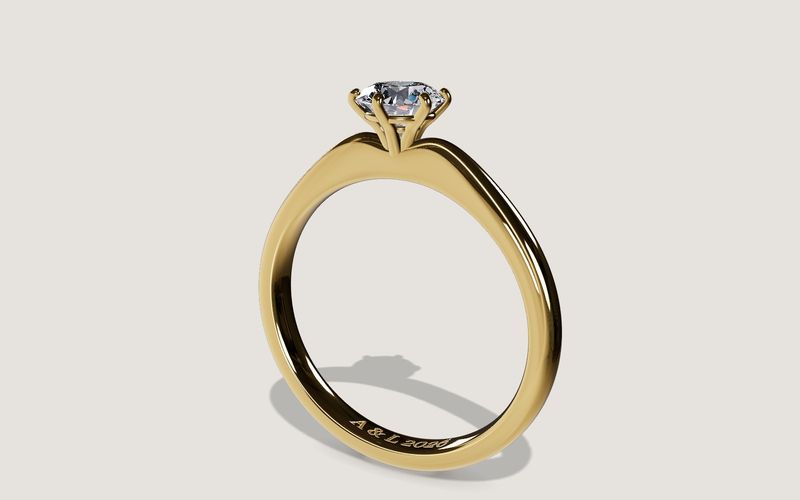
Own demo · fictional product
Solitaire ring
An engagement ring with setting, stone and engraving, in your choice of metal, stone and size.
Read next

Yurt configurator software for yurt and glamping makers
What a 3D yurt configurator needs: diameter, doors and windows placed around the lattice wall, fabrics, stain, options, a site check and an enquiry.

Yard ramp configurator for manufacturers: features, benefits, implementation
What a 3D configurator for mobile yard ramp makers must do: length, bed height, forklift slope, checks, options and an enquiry with a PDF.

Wood-fired hot tub configurator software for hot tub makers
What a 3D configurator should do for wood-fired hot tub makers: stove type, size, cover, lighting, accessories, a running price and an enquiry.