Ring configurator logic: ring size, carat, setting and engraving as rules
The parameters and rules a ring configurator needs: size as inner circumference, carat and stone diameter, prongs, engraving length and the order line.
Short answer: a ring configurator needs three kinds of rules. Dimension rules (ring size as inner circumference, stone diameter per carat), build rules (the setting and prongs adapt to the stone) and personalisation rules (engraving length, characters, position). The end result should be a summary the workshop can make the ring from without asking back. Our example configurator implements all three in simple form with example values.

What are the parameters of a solitaire ring?
The example configurator for a fictional solitaire ring has seven inputs:
| Parameter | Example values | What depends on it |
|---|---|---|
| Metal | 18k yellow, 18k rose, 18k white gold (rhodium), platinum 950 | Colour of band and head |
| Finish | Polished or brushed | Shine and texture of the band; the head stays polished |
| Stone | Diamond, sapphire, ruby, emerald | Refraction, dispersion and colour in the stone |
| Carat | 0.25 / 0.5 / 1 ct | Stone diameter and size of the head |
| Setting | 4 or 6 prongs | Build of the head |
| Ring size | 48 to 64 | Inner circumference and room for the engraving |
| Engraving | Your text, up to 16 characters | Lettering inside the band |
These are example values. Your configurator uses your alloys, your stone range and your size span.
How should a configurator handle ring size?
Ring size is a measurement, and the scales differ. ISO 8653 defines ring size as the inner circumference in millimetres, the system used in much of continental Europe. The UK, Ireland and Australia use letters with half sizes; the US and Canada use numbers in quarter steps [1]. The demo uses the ISO scale: size 54 is 54 mm round the inside, so about 17.2 mm across, and that diameter is shown next to the size. The band is recalculated for each size and visibly grows or shrinks as you drag the slider.
Two decisions matter for your configurator:
- Which scale applies? If you sell in the UK and the US as well as in Europe, the configurator needs a conversion or a separate size list per market. The conversion table should come from you.
- Which sizes are available per model? A slim band with a large stone may not make sense in every size. Limits like that belong in the data, not in a footnote.
How are carat, stone and setting linked?
In the demo, carat sets the stone diameter: 4.1 mm at 0.25 ct, 5.2 mm at 0.5 ct and 6.5 mm at 1 ct (example values for a round brilliant). The setting follows the stone: the prongs run along the lower part of the stone, grip over the girdle and are rebuilt for each stone size. The height of the head comes from the depth of the stone, so the tip stays clear of the band. Choosing four or six prongs changes the head, not the band.
That chain is typical of jewellery: one choice (carat) produces a dimension (diameter), and the dimension drives other parts (setting). A real project adds your own rules, for example:
- which carat steps exist for each stone type;
- which setting is approved for which stone;
- whether a stone is available in a particular size at all.
The wider role of rules in a manufacturer's configurator is covered in 3D configurators for manufacturers.
What rules does engraving need?
In the demo, the engraving field accepts up to 16 characters. The text is cut into the middle of the inside of the band in an italic serif and is scaled to the circumference of the chosen size, so the letters look the same at every size. After each entry the view moves in on the engraving. The sample text is "A & L 2026".
A free text field is rarely enough for production. Settle these points first:
- Length: how many characters fit at the smallest size in your typeface? A fixed limit is simple; a limit per size is more precise.
- Characters: which special characters can your engraving method do? Accents, hearts, interlocking rings, date formats.
- Typeface and position: one typeface or several; inside or outside.
- Checking: who checks the text before production, and how does the buyer confirm it?
What does the 3D model show, and what not?
The brilliant is built from its cutting planes: 57 facets at fixed angles. The same planes drive the stone's shader, which follows light through the stone: refraction, reflection and dispersion are calculated live, and coloured stones absorb light according to their colour. That makes the difference between diamond, sapphire, ruby and emerald visible. It is not an assessment of a real stone: the colour, clarity and cut quality of a particular stone are documented by your certificates and paperwork.
What should be handed over at the end?
The demo ends with the 3D model; it has no summary or enquiry. In a project, a summary line might read:
Solitaire · 18k yellow gold · polished · diamond 0.5 ct · 6 prongs · size 54 (Ø 17.2 mm) · engraving inside: "A & L 2026"
That line can go to your sales team as an enquiry by email or webhook, or be attached to the order line in your shop. Which features a jewellery configurator needs overall is covered in jewellery configurator for jewellers.
Example configurator · fictional product: Solitaire ring. Drag the ring size, change the carat and watch the engraving follow inside the band.
Common questions
Does this work for wedding ring pairs?
Yes. There are then two rings with shared and separate attributes, for example the same metal but two sizes and two engravings. That is a rule structure of its own, which we define in the project.
Can the engraving be on the outside?
Technically, yes. In the demo it is inside. For your product we set position, typeface and length from your production rules.
Sources
- Wikipedia: Ring size, sections on ISO 8653, UK/Ireland and US/Canada scales, read 14 November 2026: en.wikipedia.org
- Demo features and example values: the solitaire ring library page and the demo source /assets/mw3d/demos/ring.js (read 14 November 2026)
Examples to try
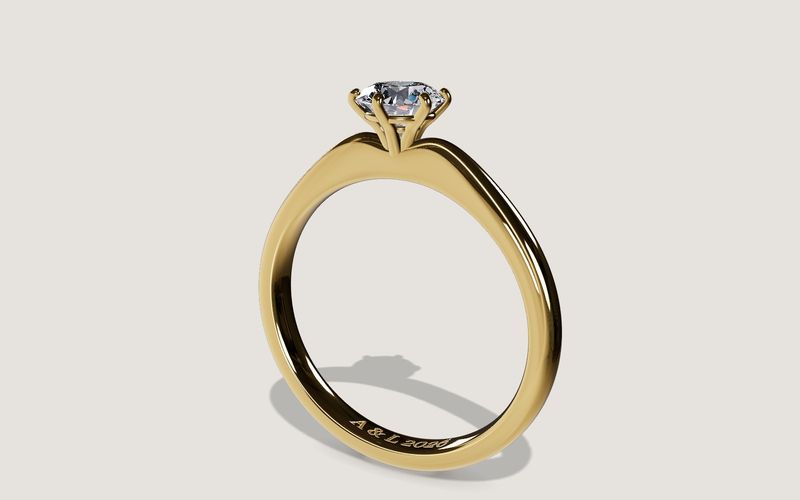
Own demo · fictional product
Solitaire ring
An engagement ring with setting, stone and engraving, in your choice of metal, stone and size.
Read next

Yurt configurator rules: placing doors and windows on the lattice wall
The rules a yurt configurator needs: wall length per diameter, the space each opening takes, a second door opposite, collision-free dragging, options.

Yard ramp slope, bed height and checks as configurator rules
How a yard ramp configurator calculates slope from length, level-off and bed height, and checks lift range, door opening and forklift clearance.

Wire partition planner rules: outline, doors and parts
The rules a wire partition planner needs: outline on a grid, wall lengths, heights, doors and service windows, ceiling and lock, layout checks and parts.