Room, walkway, door and delivery checks for a modular sofa configurator
The rules behind a modular sofa configurator: module catalogue, layouts, width, walkway, door swing and delivery checks, price from modules and fabric.
Short answer: a modular sofa configurator runs on three kinds of data and four checks. The data: a module catalogue with sizes, transport heights and prices; layout rules that turn a chosen shape into a sequence of modules; and price factors for fabric and seat depth. The checks: does the sofa fit the wall, is there a walkway in front of it, is the door swing clear, and does every module get through the door? Our example configurator works through all of this with example values.

What goes into the module catalogue?
Each module needs four values: width, depth, transport height and price. Transport height means the module with its legs off and loose cushions out, and it decides delivery later. In our demo, a fictional product with example values, the catalogue reads:
| Module | Width | Depth (95 cm seat) | Transport height | Example price, linen |
|---|---|---|---|---|
| Seat | 90 cm | 95 cm | 56 cm | €1,090 |
| Corner | 95 cm | 95 cm | 56 cm | €1,390 |
| Chaise | 90 cm | 160 cm | 56 cm | €1,490 |
| Arm | 22 cm | 95 cm | 50 cm | €340 |
| Ottoman | 90 cm | 70 cm | 35 cm | €590 |
With the 105 cm seat, every module except the ottoman gets 10 cm deeper, and the corner 10 cm wider too. In the demo that is the same 3D model stretched through the flat middle of the seat. For your range, your own module tables replace these values.
How does a shape become a sequence of modules?
The buyer picks a shape and the number of seat modules; the rest follows from rules. In the demo:
- Straight: arm, 1–4 seats, arm.
- Chaise: arm, seats, chaise, or the mirror image.
- L-shape: arm, seats, corner, plus a return of one seat and one arm.
- U-shape: corner, seats, corner, with such a return on both sides.
- Ottoman: placed flush in front of an outer seat (for L and chaise layouts, on the side away from the corner or chaise) to make a two-module lounger.
Short as they are, these rules stop variants that do not exist, such as a corner without a return. When the buyer changes shape, the same modules re-snap into place with a short animation.
Which checks does it run?
The buyer sets room width (3.0 to 6.5 m), room depth (2.8 to 6.0 m) and door width (55 to 100 cm). The demo places a coffee table in front of the sofa automatically, then runs four checks:
| Check | Rule in the demo (example values) | What the buyer sees |
|---|---|---|
| Width | overall width at most room width minus 2 cm | green with the space left, otherwise red "too wide by … cm" |
| Walkway | distance from the coffee table or front-most module to the opposite wall: green from 90 cm, amber ("tight") from 70 cm, red below | coloured floor zone and a dimension line in the plan |
| Door swing | sofa and table must stay out of the area in front of the door | swing arc in green or red |
| Delivery | each module's transport height at most door width minus 2 cm | green, or red naming the module that does not fit |
Delivery has its own view. If a module is wider than the door opening, it is turned on end and carried through; if it still does not fit, it stops in the doorway. One line shows the arithmetic, for example "Corner 95 × 95 × 56 cm → on end 56 cm ≤ 78 cm" for an 80 cm door, and another states the door the same sofa would need in one piece: 87 cm. With the example values, delivery turns red below a 58 cm door, because the seat, corner and chaise modules are 56 cm high in transport.
All limits are example values. You set the walkway you recommend and the margin you allow at the door. The checks use the buyer's inputs and are not a site survey.
How is the example price worked out?
The demo adds up the module prices, multiplies by a factor for the fabric family and one for seat depth, and rounds to the nearest €10. The factors: linen 1.0, bouclé 1.12, velvet 1.18; a 105 cm seat adds a further 1.08. Worked through with the example values of a fictional brand:
- L-shape with 2 seat modules: 2 arms, 3 seats and 1 corner = 340 + 340 + 3 × 1,090 + 1,390 = €5,340 in linen.
- The same layout in velvet: 5,340 × 1.18 = €6,301.20, rounded to €6,300.
- In velvet with the 105 cm seat: 5,340 × 1.18 × 1.08 = €6,805.30, rounded to €6,810.
Real pricing is usually richer: price groups per fabric, surcharges per module, trade prices for retailers. All of that can be modelled, and it belongs in the project brief before anything is built.
What does the buyer end up with?
The demo's summary panel shows the overall size, the number of seats, the example price, the four checks with coloured dots and the module list ("2× Arm · 3× Seat · 1× Corner"). The plan view labels room width and depth, sofa width and depth, the walkway, the gap to the coffee table and the door width. Views are 3D, plan, delivery and eye level.
No enquiry, PDF or basket is built in. In a project, exactly these lines would be passed into the enquiry or the basket, so that sales or the retailer sees the same configuration as the buyer. The technical side of upholstery, fabrics and rooms on the web is covered in furniture configurator implementation.
Try it yourself
The modular sofa in your own room is an example configurator with a fictional product; all sizes, limits and prices are example values. Try a U-shape in a 4 m deep room, then drag the door width down.
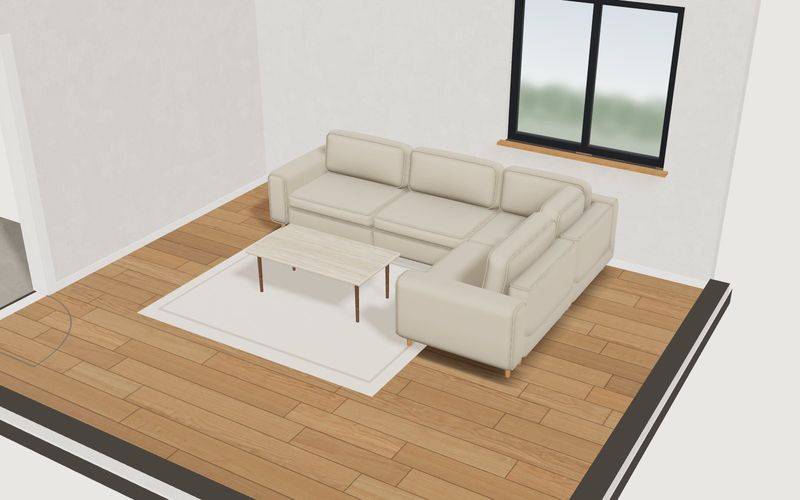
Own demo · fictional product
Modular sofa in your own room
Plan a modular sofa in your own room: room size, walkway and door are checked, and the plan view shows every dimension.
What a sofa configurator does for sales is covered in modular sofa configurator for upholstery manufacturers. How a project runs: custom 3D configurator development.
Frequently asked questions
Can the delivery check include stairs and hallways?
The demo checks the door width only. Other pinch points, such as hallway width or a stair landing, can be added as inputs; which ones are worth asking for depends on the delivery problems you actually see.
Who sets the walkway and door limits?
You do, as the manufacturer. The demo's values (90 and 70 cm for the walkway, a 2 cm margin at the door) are examples. In a project your values sit in a data table and can be changed later.
What happens when a new module joins the range?
It needs a row in the catalogue, a 3D model and possibly a new layout rule. That is why the catalogue and rules are best kept as data from the start rather than spread through the code.
Sources
- Modelwright library page "Modular sofa in your own room", list "Live in this demo", read 14 November 2026: modelwright.de/en/library/sofa-configurator/
- Module catalogue, layout rules, checks and price calculation: demo source code, /assets/mw3d/demos/sofa.js on modelwright.de, checked 14 November 2026.
Examples to try
Own demo · fictional product
Modular sofa in your own room
Plan a modular sofa in your own room: room size, walkway and door are checked, and the plan view shows every dimension.
Read next

Yurt configurator rules: placing doors and windows on the lattice wall
The rules a yurt configurator needs: wall length per diameter, the space each opening takes, a second door opposite, collision-free dragging, options.

Yard ramp slope, bed height and checks as configurator rules
How a yard ramp configurator calculates slope from length, level-off and bed height, and checks lift range, door opening and forklift clearance.

Wire partition planner rules: outline, doors and parts
The rules a wire partition planner needs: outline on a grid, wall lengths, heights, doors and service windows, ceiling and lock, layout checks and parts.